Add Days to Date

Calendar or Business-Day Date Math

100% Browser-Based Local Processing
Date & amount
The date to count from. Defaults to today.

All calculation runs locally in your browser. Your dates and holiday list are never uploaded or stored.

Target date
Choose a start date

The result will appear here.

ISO date
Calendar span
Business days
Skipped days
StartTarget

Choose a start date and amount to calculate a target date.

Privacy Focused

๐Ÿ”’ Local Processing. The values you enter never leave your device.

Instant Results

๐ŸŒ Fully Client-Side. Runs instantly in your browser.

No Signup

โšก No accounts. No API keys. Just open and use.

Browser Based

๐Ÿš€ No installs, no sign-ups, no conversion limits.

Add Days to a Date, in Calendar or Business Days

This add days to date calculator takes a start date and a number, then adds or subtracts that many days, weeks, months, or years and shows the target date, its weekday, and the ISO date. It is the tool for "what date is 45 days from today", "90 days before a hearing", or "one year after the contract start".

Turn on business-days mode and it counts only working days, stepping over Saturdays and Sundays and any holidays you paste in. That covers legal filing windows, invoice due dates, notice periods, and project deadlines quoted in working days. If you want the raw gap between two known dates instead, use the Date Difference Calculator; to go backwards from a deadline, the Deadline Calculator is built for that.

Months and years keep the same day number where the target month allows it and fall back to the last day otherwise, so the result matches how contracts and courts read date math. Everything runs in your browser, and nothing you enter is uploaded.


Add days to date calculator workspace with a start date picker, an add or subtract control, an amount stepper, a unit menu, preset chips, and a business-days switch on the left, beside the target date, ISO date, calendar span, and business days counted on the right
The whole tool on one screen: the start date, direction, amount, and business-days options sit beside the target date, its ISO date, and the span.

What This Calculator Helps With

TaskSetting to useWhy it helps
Date N days from todayAdd, days, preset chipOne tap for 7, 14, 30, 60, 90, or 365 days.
Date N days before an eventSubtract, daysCounts backwards from the start date.
Filing or notice windowBusiness days, holiday listSkips weekends and the dates you paste in.
Contract anniversaryAdd, months or yearsKeeps the day number, or the month's last day.
"Within N working days including today"Business days + count start dayMakes the start date count as day one.
Add days to date calculator in business-days mode with the count-business-days switch on and a holiday list entered, showing the target working day and the number of days skipped
Business-days mode with a holiday list: the target lands on the next working day and the result shows how many days were skipped.

How to Use the Add Days to Date Calculator

Three steps to a target date in calendar or business days.

Step 1: Set the start date and direction

Open the start date picker and choose the date to count from; it defaults to today. Use the Add / Subtract control to pick whether the target is after or before the start date. The result updates as you change any field.

Step 2: Enter the amount and unit

Type the number or use the plus and minus buttons, then choose days, weeks, months, or years. The preset chips fill common day counts in one tap. For a target measured in working days, turn on "Count business days only".

Step 3: Add holidays, then copy the target date

In business-days mode, paste holiday dates (one YYYY-MM-DD per line) so they are skipped too, and decide whether the start day counts as day one. Read the target date, its ISO form, and the calendar span, then press "Copy result" to put the summary on your clipboard. To count between two fixed dates instead, use the Business Days Calculator.

Frequently Asked Questions

How do I add days to a date?

Pick a start date, leave the control on Add, type the number of days, and keep the unit on Days. The target date, its weekday, and the ISO date update straight away. Switch the control to Subtract to count backwards from the start date instead.

Can it add business days and skip weekends?

Yes. Turn on "Count business days only" and the calculator steps over Saturdays and Sundays, counting only working days towards the total. The result panel also shows how many days were skipped so you can check the span.

How do I exclude specific holidays?

With business-days mode on, paste your holiday dates into the holiday box, one ISO date (YYYY-MM-DD) per line. Those dates are treated like weekends and skipped, so the target date lands on the next real working day.

Does it work with weeks, months, and years too?

Yes. Change the unit to weeks, months, or years. Weeks add seven calendar days each; months and years keep the same day number where possible and fall back to the last day of a shorter month, so adding one month to January 31 gives February 28 or 29.

What is the "count the start day" option?

In business-days mode it decides whether the start date itself counts as day one. Leave it off to count only the days after the start date, or turn it on when a deadline is stated as "within N working days including today".

Are my dates uploaded or stored?

No. The calculation runs in your browser with JavaScript. The start date, the amount, and any holiday list stay on your device and are never sent to Randomly.online, and there is no account to create.

Does the add days to date calculator work on a phone?

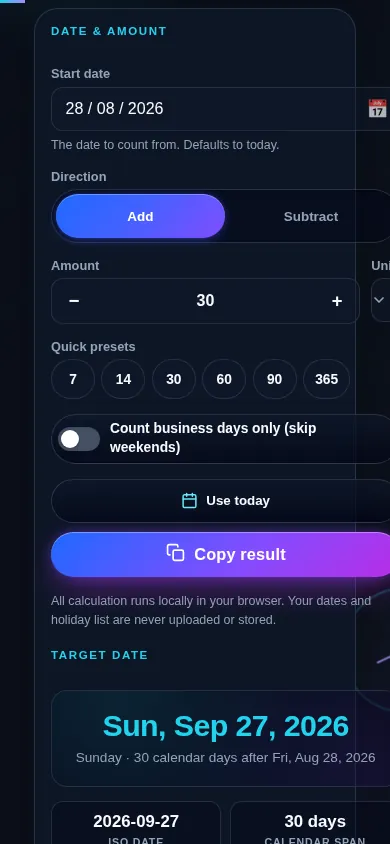
Yes. On a narrow screen the two columns stack into one: the start date picker, the add or subtract control, the amount and unit, and the business-days options sit at the top, and the target date result with its ISO date and span follows directly below. Every control meets a 44px touch target.

Add days to date calculator on a 390px phone: the start date picker, the add or subtract control, the amount and unit, and the business-days switch stacked in one column above the target date result
The add days to date calculator on a phone — one column, with the start date and controls above the target date result.

Still have questions?

If you can't find the answer you're looking for, feel free to contact our support team.

Contact Us