Text Tools

Free online text tools that run in your browser.

100% Browser-Based Local Processing

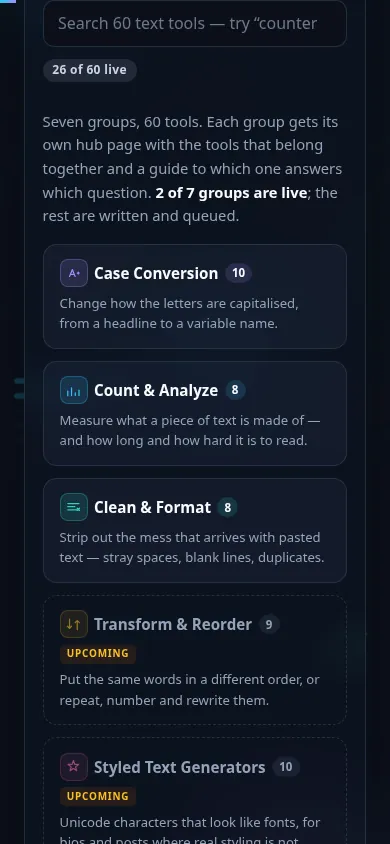
Seven groups, 60 tools. Each group gets its own hub page with the tools that belong together and a guide to which one answers which question. 4 of 7 groups are live; the rest are written and queued.

Case Conversion 10

Change how the letters are capitalised, from a headline to a variable name.

Group hub: Case Conversion — which case answers which question, and when each one is wrong.

Count & Analyze 8

Measure what a piece of text is made of — and how long and how hard it is to read.

Group hub: Count & Analyze Text — which number answers which question, and how the eight relate.

Clean & Format 8

Strip out the mess that arrives with pasted text — stray spaces, blank lines, duplicates.

Group hub: Clean & Format — which cleaner fixes which mess, and the order to run them in.

Transform & Reorder 9

Put the same words in a different order, or repeat, number and rewrite them.

Group hub: Transform & Reorder — which tool rearranges what, and the order to run them in.

Styled Text Generators 10

Unicode characters that look like fonts, for bios and posts where real styling is not allowed.

Group hub: Styled Text Generators — which style does what, and where each one breaks.

Convert & Encode 11

Turn text into another representation — a slug, a cipher, Morse, or a number written out.

Group hub: Convert & Encode — which representation survives a copy-paste, and which one does not.

Extract & Compare 4

Pull the useful part out of a blob of text, or see what changed between two of them.

Group hub: Extract & Compare — what to reach for when you have two versions, or one blob with something useful buried in it.

60 of 60 tools are live, across 7 of 7 groups. Each group has a hub page of its own. Everything runs in your browser — no upload, no account, no limit.

Privacy Focused

🔒 Local Processing. Your text never leaves your device.

Instant Results

🌐 Fully Client-Side. Runs instantly in your browser.

No Signup

⚡ No accounts. No API keys. Just open and use.

Browser Based

🚀 No installs, no sign-ups, no character limits.

What are Randomly's text tools?

Randomly's text tools are free, browser-based utilities for working with text — count words and characters, change case, clean and format, sort and transform, generate fancy text, encode, compare, and extract data. Every tool runs locally with no signup and nothing uploaded.

Need to do something with text? This is the full set of Randomly's text tools in one place — 60 focused utilities across counting, case conversion, cleaning, transforming, encoding, styled text, comparison, and extraction. Whatever the task, there's a dedicated tool, and they all run entirely in your browser.

Nothing is uploaded, there's no account, and the output is always clean — no watermark, no limits. Search for a tool by name, or browse the categories below.

Text Tools in action

Grid of text tools grouped by category.
Tool grid (categories)
Text tools hub on a phone, no app installed.
Mobile (stacked grid)

Good to know

  • Private: everything runs client-side — your text, notes, code, and lists never leave your device.
  • Free & unlimited: no signup, no paywall, no watermark, no daily cap.
  • Curated & distinct: 60 tools, each with a clear job — no thin duplicates.
  • Works everywhere: any modern browser on desktop or mobile; many work offline once loaded.

Frequently Asked Questions

What are text tools?

Text tools are small utilities for working with text — counting words, changing case, cleaning up spacing, sorting lines, generating styled text, encoding, comparing, and extracting data. Randomly offers a whole suite of them in one place, each running entirely in your browser so nothing is uploaded and there's no signup.

Are all these text tools free?

Yes. Every text tool on Randomly is free with no account, no trial, and no paywall. There's no limit on how much text you can process, and nothing adds a watermark to your output. You can use any tool as much as you like.

Do the tools upload my text to a server?

No. The text tools run as a client-side workflow, meaning whatever you type or paste is processed in your own browser and never sent to a server. That keeps your text private and makes the tools fast, with no upload or download step.

Which tool counts words and characters?

Use the Word Counter for words, characters, sentences, and paragraphs with reading time, or the Character Counter for character counts against platform limits like X, SMS, and SEO meta tags. The Word Frequency Counter ranks your most-used words.

How do I change the case of text?

The Case Converter handles every common case — UPPERCASE, lowercase, Title Case, Sentence case, and more — in one place. There are also dedicated pages for each, plus programming-case converters (camelCase, snake_case) for code identifiers.

What is a fancy text generator?

The Fancy Text Generator turns your text into styled Unicode — cursive, bold, bubble, and dozens more — that you can copy and paste into social bios and posts. These are special characters rather than real fonts, so rendering can vary by platform; keep styled text short and decorative.

Can I clean up messy text?

Yes. Remove Extra Spaces, Remove Line Breaks, Remove Empty Lines, and Trim Each Line tidy spacing and whitespace; Remove Duplicate Lines and Remove Duplicate Words dedupe; and Remove Punctuation or Remove HTML Tags strip unwanted characters and markup.

Do I need to install anything?

No. There's nothing to download or install and no account to create. Open any tool page in a modern browser on a laptop, phone, or tablet and start working immediately. Because the tools run in the browser, they work the same across Windows, macOS, Linux, Android, and iOS.

Do the text tools work on mobile?

Yes. The tools are responsive and run in your phone's browser with no app to install, so you can count, convert, clean, or style text on Android or iOS. Heavier tasks are smoother on a computer, but everyday use works fine on a phone.

Can I sort, reverse, or shuffle text?

Yes. Sort Text Lines orders lines alphabetically or numerically; Reverse Text, Reverse Word Order, and Reverse Line Order flip text in different ways; and Shuffle Lines randomizes line order using a secure random generator for a fair, unbiased shuffle.

Why aren't Base64, JSON formatting, or hashing here?

Those are developer-focused tools, so they live in Randomly's Developer Tools to avoid duplicate pages competing for the same searches. The text hub links across to them. A few text-focused variants (like a prose Text Diff Checker) are kept here with their own distinct purpose.

Are the encoding tools like ROT13 secure encryption?

No. ROT13 and the Caesar cipher are classic shift ciphers for learning and puzzles, not security — they're trivially reversible. Morse and NATO phonetic conversions are for signaling and clear communication. None of these protect data; use real encryption for anything sensitive.

Do the tools work offline?

Once a tool page has loaded in your browser, the processing happens on your device, so it doesn't need a constant connection. You'll need to be online to open the page the first time, but the actual text processing runs locally — which is also why your text isn't uploaded.

How do I find the right tool quickly?

Use the search box at the top to type what you want — like 'count', 'case', or 'reverse' — or browse the categories on this page: Case conversion, Count & analyze, Clean & format, Transform & reorder, Convert & encode, Styled generators, Compare, Numbers & words, and Extract.

Still have questions?

If you can't find the answer you're looking for, feel free to contact our support team.

Contact Us