Anniversary Calculator

Exact Years, Months & Days Since Any Date

100% Browser-Based Local Processing
Your date
Use the month and year menus to jump to any decade. Leave the time at 00:00 to count from midnight.

All calculation runs locally in your browser. Your dates and the label are never uploaded or stored.

Time elapsed
Select a date to start

The breakdown updates every second while it counts from your date to right now.

0Years
0Months
0Days
00Hours
00Minutes
00Seconds
Total days
Total weeks
Total months
Total hours
1 year 
5 years 
10 years 

Privacy Focused

πŸ”’ Local Processing. The values you enter never leave your device.

Instant Results

🌐 Fully Client-Side. Runs instantly in your browser.

No Signup

⚑ No accounts. No API keys. Just open and use.

Browser Based

πŸš€ No installs, no sign-ups, no conversion limits.

How Long It Has Been, Down to the Second

This anniversary calculator takes one date — a wedding, a first date, a sober day, the day a business opened — and tells you exactly how much time has passed since: the years, months and days, then the hours, minutes and seconds on top. In "Since a date" mode the last cell keeps moving, because the answer keeps changing.

Underneath the breakdown are the plain totals people usually want next: how many days, weeks, months and hours it adds up to. And under those, the dates of the first, fifth and tenth anniversaries, each marked as passed or with the days still to go.

Switch to "Between two dates" and it measures the gap between two dates you choose instead, which is the same question the Date Difference Calculator answers in plain days. For a birth date rather than a shared one, the Age Calculator is the closer fit. Everything here is worked out from your device's clock, and nothing about your dates leaves the browser.
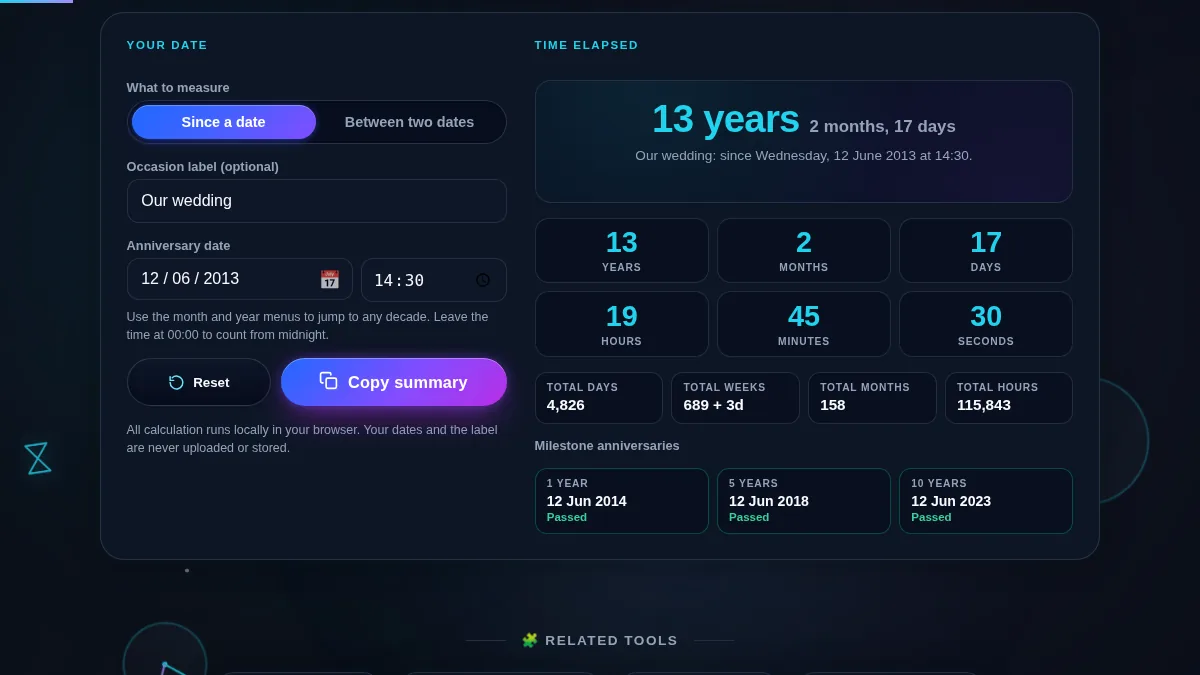
Anniversary calculator workspace with a since-a-date and between-two-dates switch, an occasion label and a date and time picker on the left, beside a years-and-months headline, a six-cell years-to-seconds breakdown, four totals and three milestone cards on the right
The whole tool on one screen: the date and options sit beside the elapsed headline, the six-cell breakdown, the totals and the milestone dates.

What Each Result Means

ResultWhat it showsGood for
HeadlineThe years and months, written the way people say itCard wording and captions.
Six-cell breakdownYears, months, days, hours, minutes, secondsThe exact calendar answer.
Total daysWhole days between the two instantsDay-count milestones like 5,000 days.
Total weeksWhole weeks, and the days left overPlanning in weeks.
Total monthsWhole calendar months, not days divided by 30Month-based anniversaries.
Milestone datesThe 1, 5 and 10 year dates, passed or days awayBooking the next celebration.
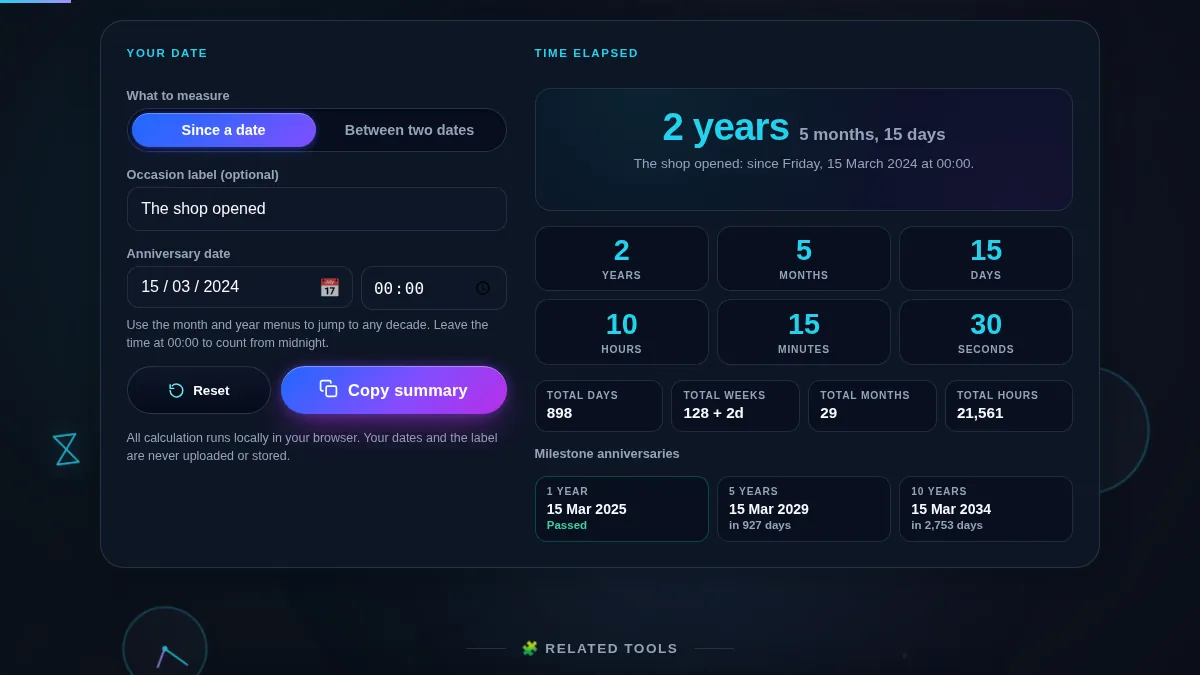
Anniversary calculator totals and milestone cards showing total days, weeks, months and hours above the 1, 5 and 10 year anniversary dates with days remaining
The totals row and the milestone dates: whole days, weeks, months and hours, then the 1, 5 and 10 year anniversaries.

How to Use the Anniversary Calculator

Three steps to an exact answer you can copy.

Step 1: Pick the date it started

Open the date picker and use the month and year menus to jump straight to the right decade rather than paging back a month at a time. The breakdown starts the moment a date is chosen. The occasion label above it is optional and only used to head the copied summary.

Step 2: Add the time of day, or leave it at midnight

The time field starts at 00:00, which counts from midnight on the date you picked. Put in the hour of the ceremony or the moment you met and the hours, minutes and seconds become a real reading rather than a count from the start of the day.

Step 3: Read it, switch modes, or copy it

"Copy summary" puts the headline, the totals and the next milestone on your clipboard as one line of text. Switch to "Between two dates" to reveal a second date and measure a fixed gap instead; the milestone cards step aside, because a gap between two past dates has nothing coming. To jump forward from a date rather than back, use Add Years to Date.

Frequently Asked Questions

How does the anniversary calculator work?

It reads the date you pick and compares it with your device’s own clock. From that it works out the exact time that has passed in years, months, days, hours, minutes and seconds, plus running totals in days, weeks, months and hours. In "Since a date" mode the seconds keep ticking; in "Between two dates" mode the answer is fixed to the two dates you gave it.

Why show years, months and days instead of just a day count?

Because months are not all the same length. "12 years, 3 months and 5 days" is how people actually describe an anniversary, and getting there means borrowing from the previous month rather than dividing a day count by 30.44. Both readings are on the page: the breakdown at the top is the calendar answer, and the totals row underneath gives the plain day, week, month and hour counts.

What is the difference between the two modes?

"Since a date" measures from your date to right now and updates every second, which is what you want for a wedding date or a first date. "Between two dates" measures the gap between two dates you choose, so the answer stays still. Milestone dates are only shown in the first mode, because a fixed gap between two past dates has no upcoming milestone.

Does the time of day matter?

Only if you set it. The time fields start at 00:00, so leaving them alone measures from midnight on the date you picked. If you know the hour you got married or met, put it in and the hours, minutes and seconds in the breakdown become real rather than a count from midnight.

How are the 1, 5 and 10 year milestone dates worked out?

Each one is the same day and month as your start date in the year that many years later, so a 12 June start gives 12 June the following year, 12 June five years on, and 12 June ten years on. A 29 February start rolls to 1 March in years that are not leap years. Passed milestones are labelled; upcoming ones show how many days are left.

Is my date uploaded or stored?

No. Everything is worked out in your browser with JavaScript. The date, the time and the optional label are used for the result and the copied summary and nothing else. Nothing is sent to Randomly.online, and there is no account to create.

Does the anniversary calculator work on a phone?

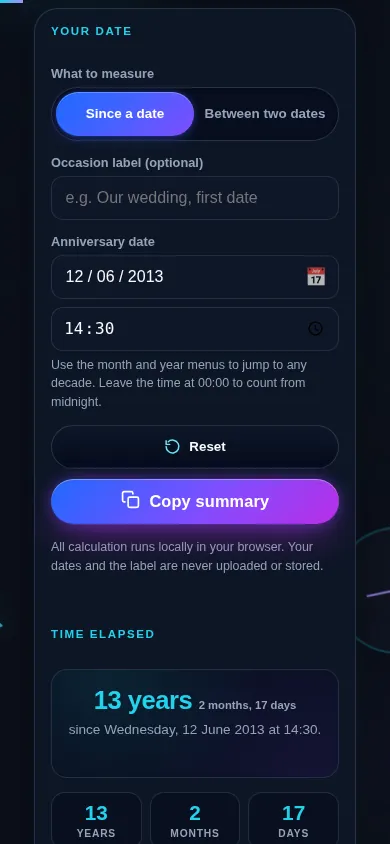
Yes. On a narrow screen the two columns stack into one: the mode switch, the label and the date and time fields sit at the top, and the headline, the six-cell breakdown, the totals and the milestone dates follow directly below. Every control meets a 44px touch target.

Anniversary calculator on a 390px phone: the mode switch, occasion label and start date and time stacked in one column above the years-and-months headline and the start of the six-cell breakdown
The anniversary calculator on a phone — one column, with the date and time above the live breakdown.

Still have questions?

If you can't find the answer you're looking for, feel free to contact our support team.

Contact Us