Date to Timestamp Converter

Date & Time to Unix Epoch

100% Browser-Based Local Processing
Date & time
Any date from 1900 onward. Dates before 1970 give a negative timestamp.
Hour, minute, second.
Read the date and time as

The date you pick stays in your browser. Nothing is uploaded, logged, or saved.

Unix timestamp
Pick a date

The epoch value and ISO string will appear here.

Milliseconds
Relative to now
ISO 8601
Reads as
Weekday

Privacy Focused

🔒 Local Processing. The values you enter never leave your device.

Instant Results

🌐 Fully Client-Side. Runs instantly in your browser.

No Signup

⚡ No accounts. No API keys. Just open and use.

Browser Based

🚀 No installs, no sign-ups, no conversion limits.

Turn a Date and Time Into a Unix Timestamp

Code, databases, and APIs rarely store a date as words. They store a Unix timestamp — a plain count of seconds since the start of 1970 — because a number is easy to sort, compare, and do arithmetic on. This converter builds that number from a date and time you choose, and gives you both the seconds value and the millisecond value alongside the ISO 8601 string.

The one decision that matters is which instant your date points at. Read it as local time when the date and time sit on someone's wall clock, such as an event start or a form field. Read it as UTC when the value already came from a server or a log. The switch changes the instant, so the timestamp moves with it. To go the other way, from a number back to a date, use the Timestamp to Date Converter.

Everything is computed in your browser. The date you pick is never sent anywhere, and the seconds and millisecond values each have their own copy button.
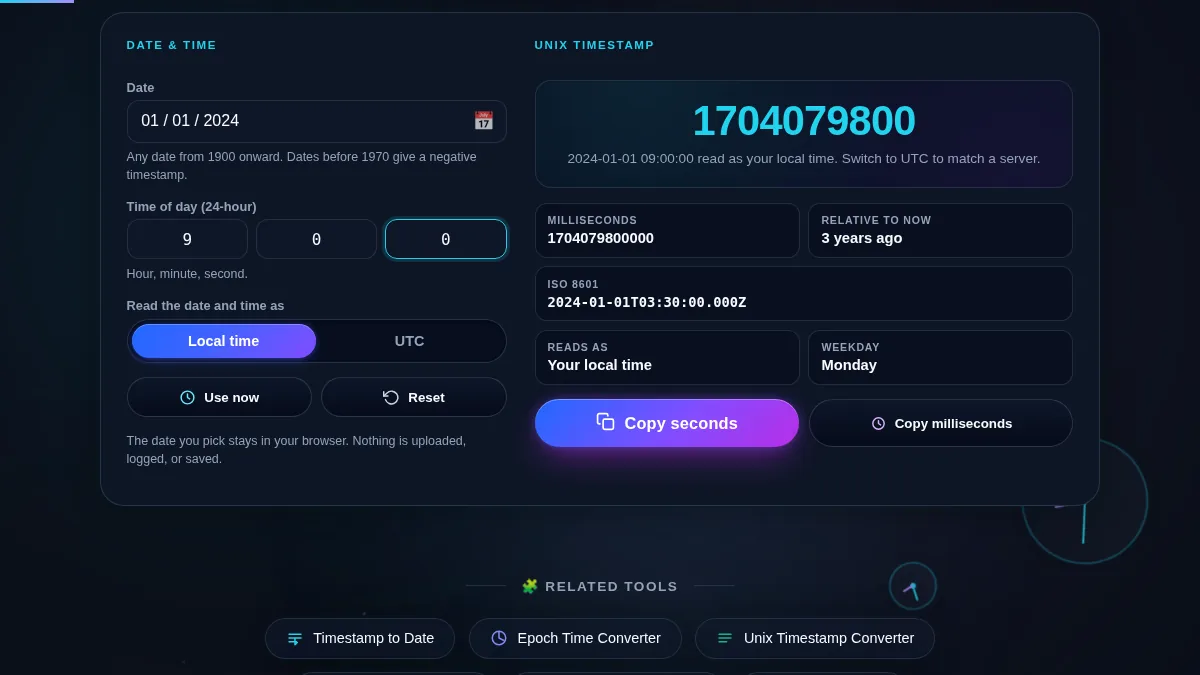
Date to timestamp converter workspace with a date picker, hour, minute and second fields, and a Local time / UTC control on the left, and on the right the Unix timestamp in seconds, the millisecond value, the ISO 8601 string, and a relative time from now
The whole tool on one screen: the date and time fields and the Local or UTC control sit beside the Unix timestamp, the millisecond value, and the ISO 8601 string.

When You Need a Timestamp From a Date

SituationWhich value to copyRead the date as
Seeding a database row or a fixtureSecondsUTC, to match how the column is stored
A setTimeout target or a JavaScript DateMillisecondsLocal time, for a wall-clock deadline
A cron or scheduler that takes epoch secondsSecondsUTC
An API filter such as since= or before=Whatever the docs specifyUTC
A test for a historical date before 1970Seconds (negative)UTC
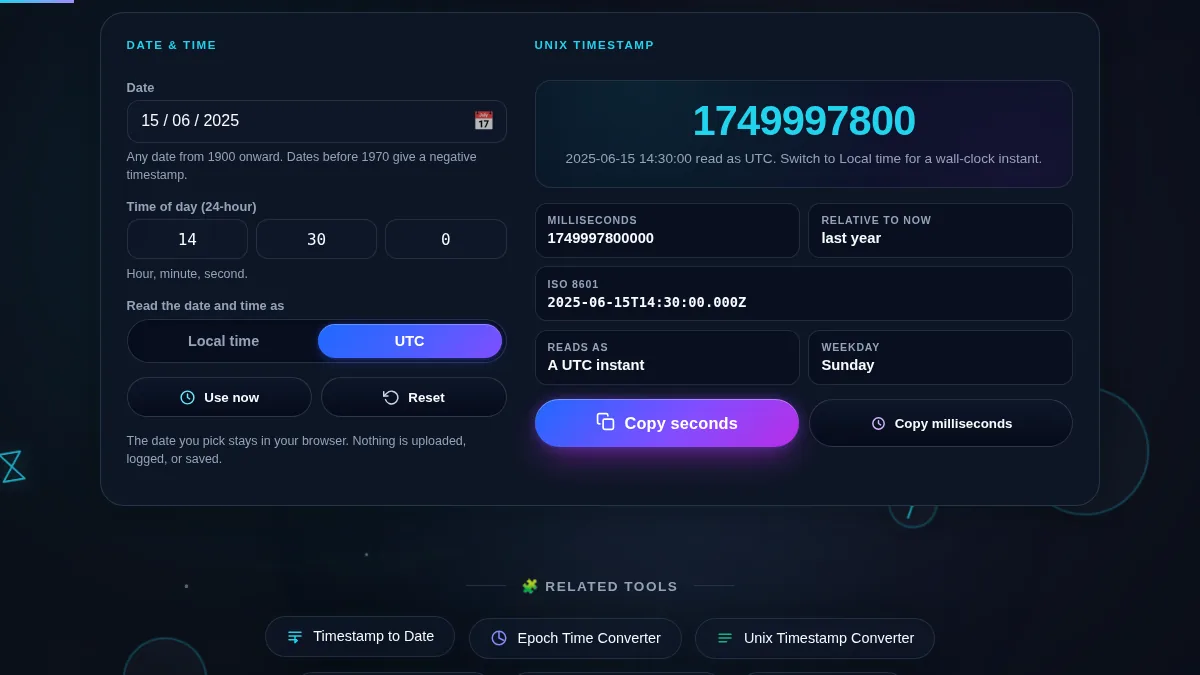
Date to timestamp converter with the Local time / UTC control set to UTC, so the chosen date and time are read as a UTC instant and the seconds and millisecond values update to match
Set the control to UTC and the same picked date and time point at a different instant, so the timestamp changes.

How to Convert a Date to a Timestamp

Three steps, and the result updates as you change any field.

Step 1: Pick the date

Open the date picker and choose the day, month, and year. The month and year dropdowns jump to any decade, so a date in the 1980s is as quick to set as one next month. Press "Use now" to drop in today's date and the current time.

Step 2: Set the time and the time zone

Type the hour (0 to 23), minute, and second. Leave them at zero for midnight. Then choose Local time or UTC: this decides which instant the date points at, which is the difference between a timestamp that matches your clock and one that matches a server's.

Step 3: Copy the value you need

The headline is the timestamp in seconds. The cards below show the same instant in milliseconds, the ISO 8601 string, the weekday, and how far the date is from now. "Copy seconds" and "Copy milliseconds" each put one value on your clipboard. To read a number back as a date, use the Timestamp to Date Converter.

Frequently Asked Questions

What is a Unix timestamp?

A Unix timestamp, also called epoch time, is the number of seconds between 00:00:00 UTC on 1 January 1970 and the instant you are describing. It is a single number with no time zone, which makes it easy to store, sort, and compare. This tool builds that number from a date and time you choose.

Does the result use seconds or milliseconds?

Both are shown. The headline value is in seconds, which is what Unix systems, cron, and most APIs expect. The card below it is the same instant in milliseconds, which is what JavaScript's Date.now and many web APIs use. Each has its own copy button.

Should I read my date as local time or as UTC?

Use local time when the date and time you have are on someone's wall clock, for example an event start or a form entry. Use UTC when the value already came from a server or a log that records UTC. The switch changes which instant the date points at, so the timestamp changes with it.

Can I make a timestamp for a date before 1970?

Yes. Dates before the Unix epoch produce a negative timestamp, which is valid and is what most systems expect for historical dates. Pick any year back to 1900 in the date picker and the seconds and millisecond values will both be negative.

Can I convert a timestamp back into a date?

Yes, with the companion tool. The Timestamp to Date Converter takes a Unix value in seconds, milliseconds, or microseconds and shows the date in local time and UTC, so the two tools cover both directions.

Is the date I enter uploaded or stored anywhere?

No. The conversion runs in your browser with JavaScript. The date and time you pick are never sent to Randomly.online, nothing is logged, and there is no account to create.

Does the date to timestamp converter work on a phone?

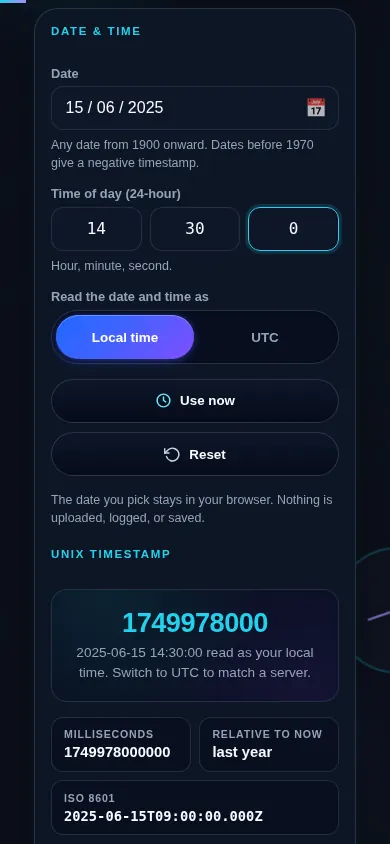
Yes. On a narrow screen the two columns stack into one: the date picker, the time fields, and the local-or-UTC control sit at the top, and the Unix timestamp, the millisecond value, and the ISO string follow directly below. The calendar popup opens centred and every field and button meets a 44px touch target.

Date to timestamp converter on a 390px phone: the date picker, the hour, minute and second fields, and the Local time / UTC control stacked in one column above the seconds timestamp, the millisecond value, and the ISO 8601 string
The date to timestamp converter on a phone — one column, with the date and time fields above the Unix timestamp.

Still have questions?

If you can't find the answer you're looking for, feel free to contact our support team.

Contact Us