Monthly Calendar Generator

One Month, Sized and Titled for Printing

100% Browser-Based Local Processing
Month settings
Step a month

This month

Privacy Focused

🔒 Local Processing. The values you enter never leave your device.

Instant Results

🌐 Fully Client-Side. Runs instantly in your browser.

No Signup

⚡ No accounts. No API keys. Just open and use.

Browser Based

🚀 No installs, no sign-ups, no conversion limits.

A Monthly Calendar You Can Actually Write On

This monthly calendar generator does one thing: it builds a single month, sized for the paper it is going on. Choose the month and year, give it a heading, pick how tall the day cells should be, and turn on ruled writing lines if the calendar is going to be filled in by hand.

The three cell sizes matter more than they sound. Compact fits a month into a corner of a shared document; standard is the usual desk calendar; large gives every day six lines of writing room, which is what a chore chart, a training plan, or a shift rota needs. The heading field replaces the default "October 2026" with whatever the calendar is for, so the printed sheet explains itself.

If you need several months at once, the Calendar Generator does month, quarter, and year layouts, and the Yearly Calendar Generator handles a full twelve months. Everything here is drawn in your browser; no month, heading, or note ever leaves your device.
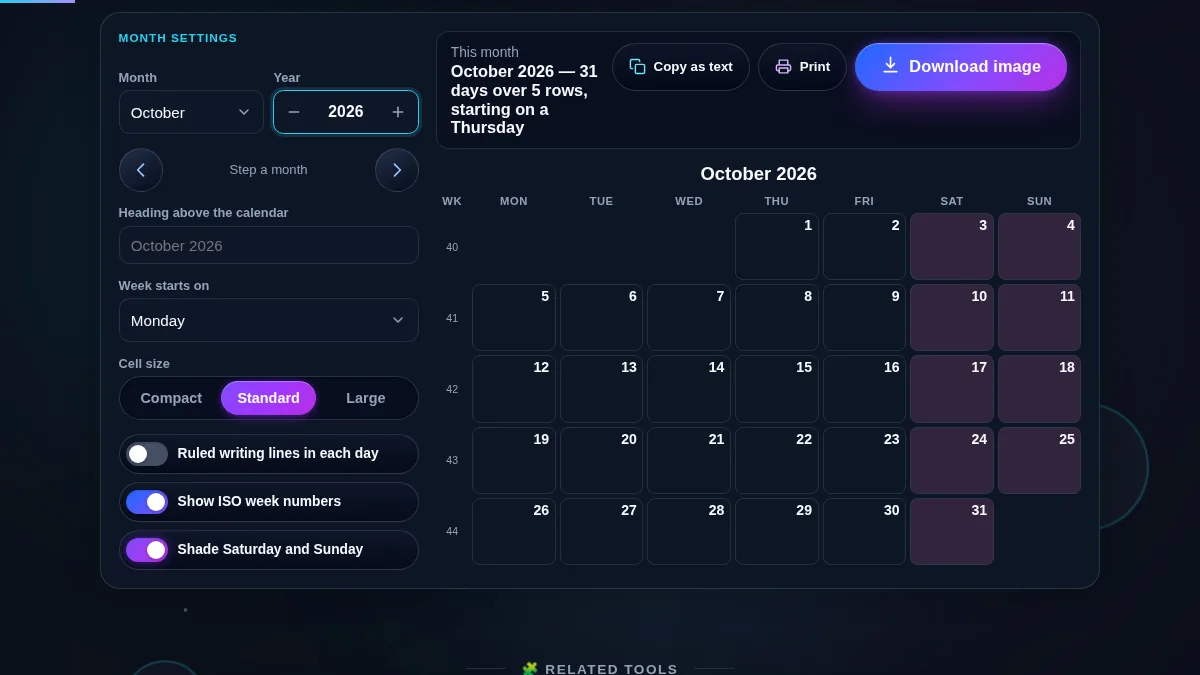
Monthly calendar generator workspace with the month, year, heading, week-start and cell-size controls on the left and a full October 2026 month grid with shaded weekends on the right
The whole tool on one screen: the settings panel beside the month it produces.

What a Printable Month Calendar Gets Used For

UseSettings to useWhy it works
Fridge or wall plannerLarge cells, ruled linesSix writing lines per day survive a whole family's handwriting.
Shift rota or staff rosterLarge cells, custom headingThe heading names the team, so an unpinned sheet still makes sense.
Habit or chore trackerStandard cells, weekends shadedEnough room for a tick, and the weekend blocks are obvious.
Sprint or delivery monthWeek numbers onISO week numbers line the calendar up with the schedule everyone quotes.
A month inside a reportCompact cellsSmall enough to sit beside text without dominating the page.
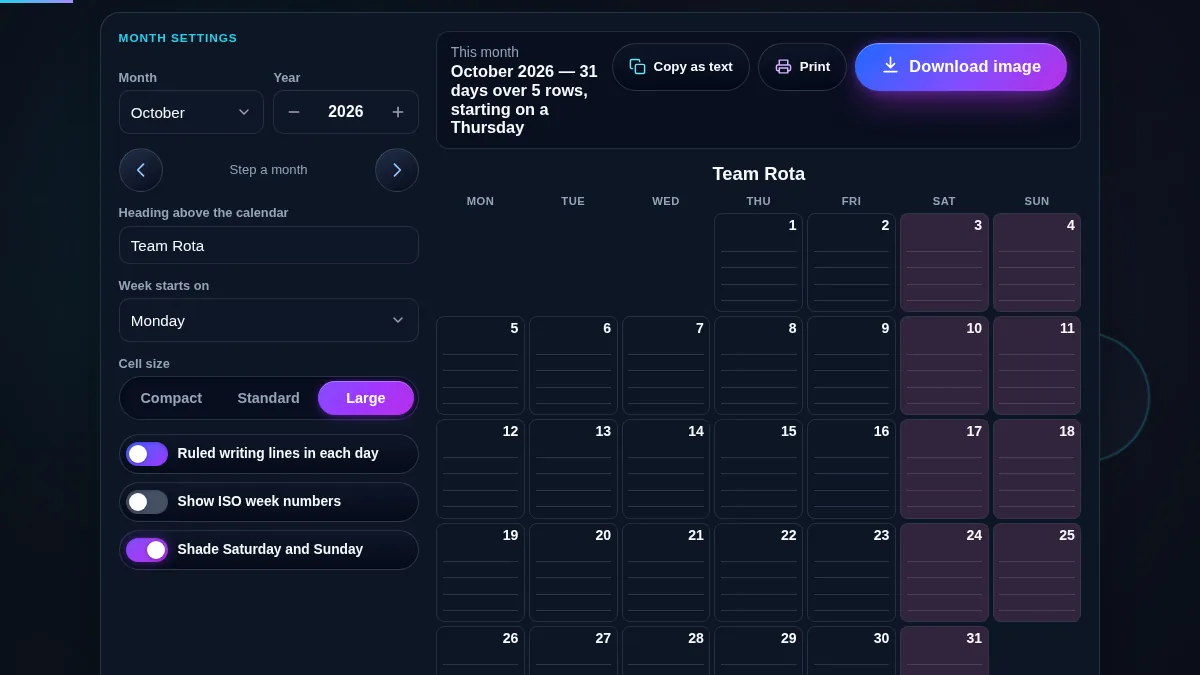
Monthly calendar generator at the large cell size with ruled writing lines inside every day and a custom heading reading Team Rota above the October 2026 grid
Large cells with ruled lines and a custom heading — the layout meant to be printed and written on.

How to Use the Monthly Calendar Generator

Three steps from today to a printed month.

Step 1: Pick the month

Choose the month and type the year, or use the arrows to step forward and back a month at a time — they roll over the year boundary correctly, so December steps to January of the next year. Any year from 1583 to 2200 is accepted, and the weekday alignment is correct for all of them.

Step 2: Size it and title it

Set the cell size to Compact, Standard, or Large depending on how much gets written in each day, and turn on ruled writing lines if the sheet is going to be filled in by hand. Type a heading — "Team Rota", "Marathon Plan", "October 2026" — and it replaces the default title above the grid, on screen and on paper.

Step 3: Print or copy

"Print calendar" hides the entire page except the grid and its heading, prints weekend shading as light grey so it survives a black-and-white printer, and makes the day cells taller than they are on screen so there is room to write. "Copy as text" gives you a plain-text month for a message or a ticket. For a longer horizon, switch to the Yearly Calendar Generator.

Frequently Asked Questions

How do I make a printable calendar for one month?

Choose the month and year, pick a cell size, and press "Print calendar". The print layout removes the site header, the settings panel, the buttons, and the footer, so the sheet that comes out of the printer holds the heading and the grid and nothing else.

Can I download the calendar as an image or a PDF?

Yes. Press Download and pick light or dark, then PNG or PDF. The sheet shows a preview of each finish, drawn by the same code that writes the file, so what you choose is what you get. Your heading, the cell size, the ruled writing lines and the week numbers all come through. PNG comes out at twice screen size; PDF puts the same picture on an A4 or US Letter page, ready for the printer. Either way the file is drawn on your device, so the calendar never leaves the browser.

Can I add my own title above the calendar?

Yes. The heading field takes up to 60 characters and replaces the default month-and-year title. It appears in the same place on screen and in print, so a rota, a revision plan, or a project month can name itself rather than relying on whoever pinned it up to remember.

Can I get lines to write on inside each day?

Turn on "Ruled writing lines in each day". Every day cell gains evenly spaced rules that fill whatever height the cell has, so the large size gives roughly six lines per day and the standard size around three. The lines print as light grey, which stays readable under pen without dominating the page.

Why does the calendar have five rows some months and six in others?

A month needs six rows whenever its days cannot fit into five weeks — that happens when the first day falls late in the week and the month is long. The summary line above the grid says how many rows the current month uses, which is worth checking before you commit a design to paper.

Can I start the week on Sunday?

Yes. The "Week starts on" list offers Sunday, Monday, and Saturday. The column order, the weekend shading, and the week numbers all follow the choice. Monday is the default because it matches ISO 8601; Sunday is the usual choice in the United States, Canada, and Japan.

Is anything I type stored or uploaded?

No. The heading you type and the month you choose stay in your browser. Nothing is sent to Randomly.online, nothing is saved between visits, and there is no account. Printing hands the page straight to your own printer.

Does the monthly calendar generator work on a phone?

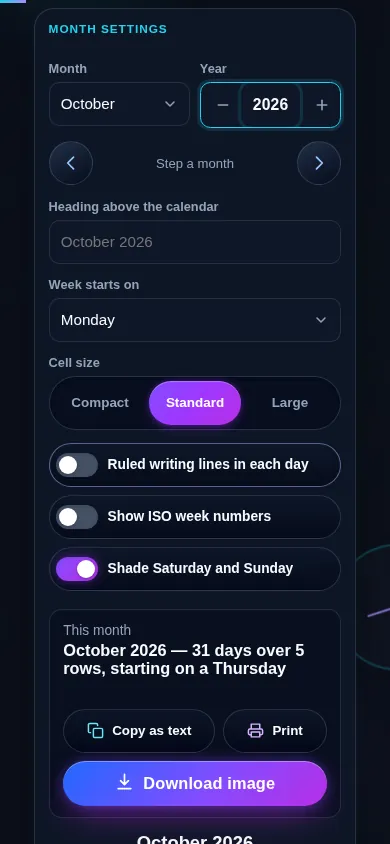
Yes. On a narrow screen the two columns stack into one: the month and year fields, the heading, the cell size control, and the switches sit at the top, with the calendar directly below. All seven day columns stay on screen, and every control meets a 44px touch target.

Monthly calendar generator on a 390px phone: the month and year fields, heading input and option switches stacked in one column above a full seven-column month grid
The monthly calendar generator on a phone — one column, settings above the grid.

Still have questions?

If you can't find the answer you're looking for, feel free to contact our support team.

Contact Us