Time Zone Difference

Compare Two Zones, Clocks And Overlap

100% Browser-Based Local Processing
Difference
Base location
    ––:––:––  
    UTC offset
    Comparison location
      ––:––:––  
      UTC offset
      BaseWorking hours 09:00–17:00 shaded
      ComparisonOverlap –

      One column is one instant, so a column shaded in both rows works for both.

      Both clocks, the offsets and the overlap are worked out in your browser from its own time-zone database. Nothing you choose is uploaded or stored.

      Privacy Focused

      🔒 Local Processing. The values you enter never leave your device.

      Instant Results

      🌐 Fully Client-Side. Runs instantly in your browser.

      No Signup

      ⚡ No accounts. No API keys. Just open and use.

      Browser Based

      🚀 No installs, no sign-ups, no conversion limits.

      Time Zone Difference: The Answer, Then The Working Day

      Two questions hide inside "what is the time difference between these two places". The first is arithmetic: how many hours and minutes separate the two clocks right now. The second is the one you actually needed the answer for: given that gap, when can both of us be at a desk at the same time. This tool answers the first in a sentence at the top and the second on the strip underneath.

      The difference is read from the browser's own time zone database for the date being shown, never by adding a fixed number of hours. That matters more often than it sounds. London and New York are five hours apart for most of the year and four hours apart for two weeks each March, because the two countries move their clocks on different days. A tool that stores "New York is UTC minus five" is wrong for those weeks, and wrong all summer.

      Every reading is a real one. Both panels run a live clock, both show the UTC offset that is in force, and half-hour and 45-minute zones are reported as they are rather than rounded, so Kolkata at UTC+05:30 and Kathmandu at UTC+05:45 come out exactly. To watch several zones at once instead of two, use the Meeting Time Planner.
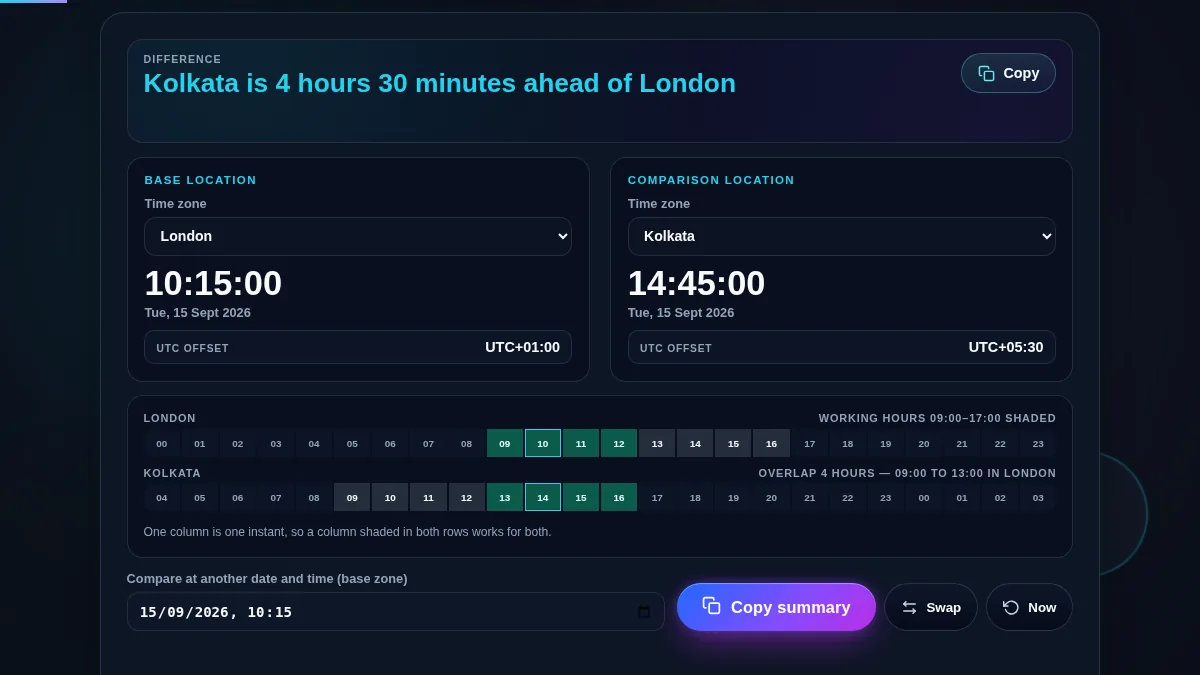
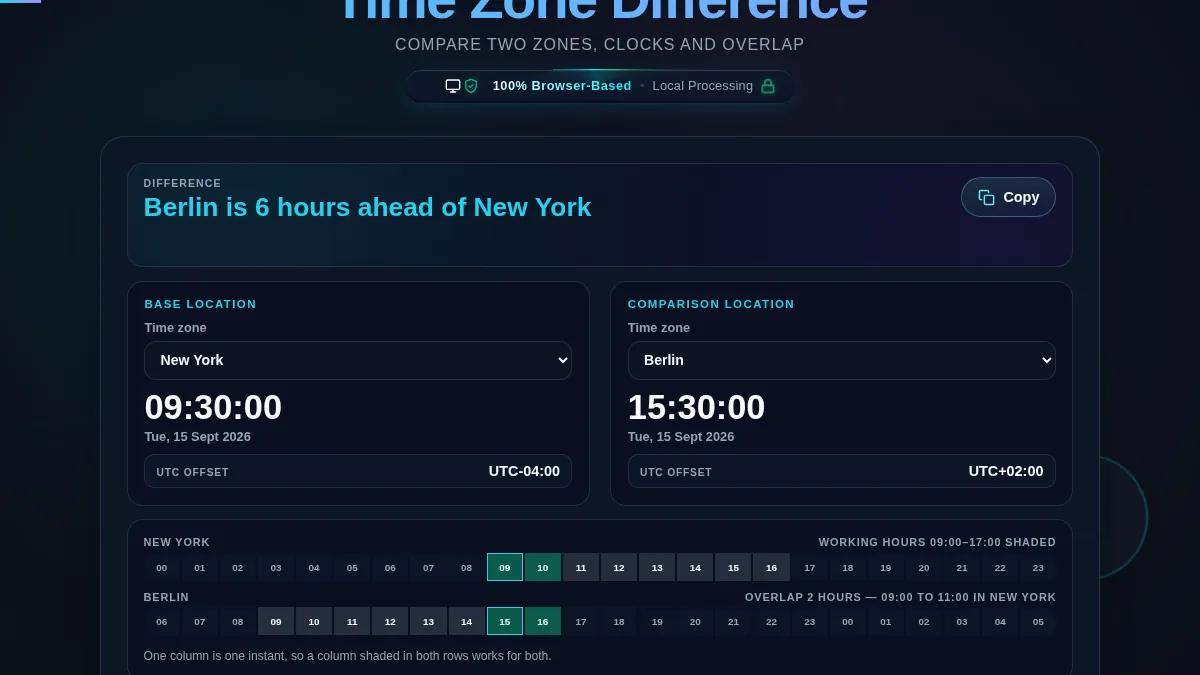
      Full time zone difference workspace: the difference sentence across the top, a base panel and a comparison panel each with a zone selector, a running clock and a UTC offset, the two-row 24-hour strip with shaded working hours, and the date field with Copy summary, Swap and Now buttons
      The whole tool on one screen: the difference in words, both clocks, and the aligned 24-hour strip.

      What Each Reading On The Page Means

      ReadingWhat it tells youWhere it comes from
      The sentence at the topHow far ahead or behind the comparison zone is, in hours and minutesThe two UTC offsets in force on the date shown, subtracted
      The clock in a panelThe wall clock reading in that zone at the instant being shownThe browser's time zone data, asked for the parts in that zone
      UTC offsetHow far that zone sits from UTC on this date, including daylight savingThe long offset name for that zone and instant
      A shaded cellThat hour is between 09:00 and 17:00 in its own zoneThe hour the cell prints, in that row's zone
      A column shaded in both rowsAn hour inside working hours in both places at onceBoth rows are the same 24 instants, so a column is one moment
      The overlap lineHow many such hours there are, and the window in the base zone's timeThe count of doubly shaded columns, and the first and last of them
      The two-row 24-hour strip of the time zone difference tool with the columns that are working hours in both zones highlighted in both rows and the overlap line above counting them and naming the window
      A column shaded in both rows is an hour that is inside the working day in both places.

      How to Compare Two Time Zones

      Four steps from two city names to a meeting slot.

      Step 1: Set the base location

      The base is the zone you are thinking in, and it starts on the one your device reports. Everything else is expressed against it: the difference sentence reads "the other place is ahead of the base", the overlap window is named in base-zone hours, and the date field at the bottom is read as a base-zone wall clock. Opening either selector loads the full IANA list, so anything from Pacific/Chatham to Africa/Ouagadougou is available.

      Step 2: Pick the comparison location

      Choose the other city and the sentence at the top rewrites itself, both clocks start running, and both offsets appear. If you picked them the wrong way round, Swap exchanges the two without retyping anything. The offsets are worth a glance on their own: they are what the difference is calculated from, and a zone whose offset is not a whole number of hours is where most mental arithmetic goes wrong.

      Step 3: Read the overlap off the strip

      The two rows are the same 24 instants, one column per hour of the base zone's day, so reading straight down a column gives you both clocks at that moment. Columns shaded in both rows are the hours that are inside working hours in both places, and the line above the second row counts them and names the window. When that line says there is no overlap, one of the two of you is taking an early or a late call, and the strip shows which end is cheaper.

      Step 4: Check the date the meeting is actually on

      Type the date and time into the field at the bottom and both panels move to that instant, with the live clock paused so the reading holds still. A recurring call booked in October can be an hour out by November, and this is where you see it before your calendar does. Copy summary puts the whole thing on the clipboard as text, both clock readings, both offsets, the difference and the overlap, ready to paste into the invitation. Press Now to return to the live clock.

      Frequently Asked Questions

      How do I find the time difference between two time zones?

      Pick a base location and a comparison location from the two selectors. The bar at the top writes the answer as a sentence, each panel shows that zone's current clock and its UTC offset, and the strip underneath lines both zones up hour by hour so you can see the working day in each. Nothing needs to be pressed; the reading updates as soon as a zone changes.

      Why does the difference between the same two cities change during the year?

      Because daylight saving does not start and end on the same day everywhere, and some places do not observe it at all. London and New York are five hours apart for most of the year but four hours apart for the two weeks in March when the United States has moved its clocks and the United Kingdom has not. The tool reads the offset for the date you are looking at, so it shows four or five hours as the date requires.

      What is the shaded strip under the two panels?

      It is a 24 hour day laid out twice, and both rows are the same 24 instants rather than two independent clocks. A cell is shaded when that hour falls between 09:00 and 17:00 in its own zone, and a column shaded in both rows is an hour that is inside working hours in both places. The line above the second row counts those columns and names the window in the base zone's own time.

      Can I check the difference for a date in the future?

      Yes. Type a date and time into the field at the bottom, read as a wall clock in the base zone, and both panels jump to that instant and the live clock stops. This is how you check whether a meeting six weeks out still lands where you expect, because one of the two zones may change its clocks in between. Press Now to go back to the live reading.

      Does it handle half hour and 45 minute offsets?

      Yes. India is at UTC+05:30, Nepal at UTC+05:45, Chatham Island at UTC+12:45, and parts of Australia sit on half hours, so a difference is reported in hours and minutes rather than rounded to whole hours. The offsets come from the browser's own time zone database, which is the same data your operating system uses.

      Is my data uploaded or stored anywhere?

      No. Every clock, offset and overlap on this page is worked out in your browser with JavaScript. The zones you pick and the date you type are never sent to Randomly.online, nothing is logged, and there is no account to create.

      Does the time zone difference calculator work on a phone?

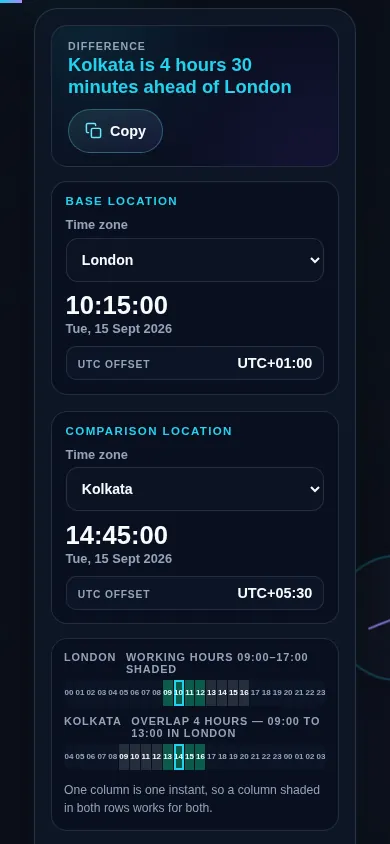
      Yes. On a narrow screen the two zone panels stack into one column with the difference sentence kept at the top, the 24 hour strip stays a single row of cells that shrink to fit, and the buttons at the bottom spread across the width. Every control meets a 44px touch target.

      Time zone difference calculator on a 390px phone: the difference sentence at the top, then the base zone panel and the comparison zone panel stacked in a single column above the 24-hour strip
      The time zone difference calculator on a phone — one column, with the difference sentence kept at the top.

      Still have questions?

      If you can't find the answer you're looking for, feel free to contact our support team.

      Contact Us