Time Zone Offset Finder

The UTC Offset For Any Zone, On Any Date

100% Browser-Based Local Processing
UTC offset
Zone and moment
    GMT offset
    Reading at that moment
     
    UTC equivalent
    Abbreviation
    Zone id
    Where it sits on the UTC line
    UTC−12UTC±00UTC+14
    Standard offset
    Daylight offset


    Every offset, clock and conversion on this page is worked out in your browser from its own time-zone database. The zone you pick and the date you type are never uploaded or stored.

    Privacy Focused

    🔒 Local Processing. The values you enter never leave your device.

    Instant Results

    🌐 Fully Client-Side. Runs instantly in your browser.

    No Signup

    ⚡ No accounts. No API keys. Just open and use.

    Browser Based

    🚀 No installs, no sign-ups, no conversion limits.

    An Offset Is Only True For A Date

    A UTC offset says how far a place sits from Coordinated Universal Time: New York at UTC-04:00 is four hours behind it, Kolkata at UTC+05:30 is five and a half hours ahead. The number is easy. What catches people out is that for roughly a third of the world it is not one number. Clocks move twice a year, the two hemispheres move them in opposite seasons, and the dates are set by law rather than by arithmetic, so an offset quoted with no date attached is a guess that happens to be right for part of the year.

    This tool asks for the date along with the zone, and reads the offset your browser's own time zone database holds for that instant. Set it to a day in July and a day in January and a European or North American zone will give you two different answers, both correct. That is the whole reason the date field is there rather than assumed to be today.

    Everything else on the page follows from that one reading: the GMT-style spelling for systems that ask for it, the UTC equivalent of the clock time you typed, the browser's short name for the zone, and the two offsets the zone uses across the year with the one in force marked. To compare two places rather than look one up, use the Time Zone Difference calculator; to find a slot that suits several, the Meeting Time Planner.
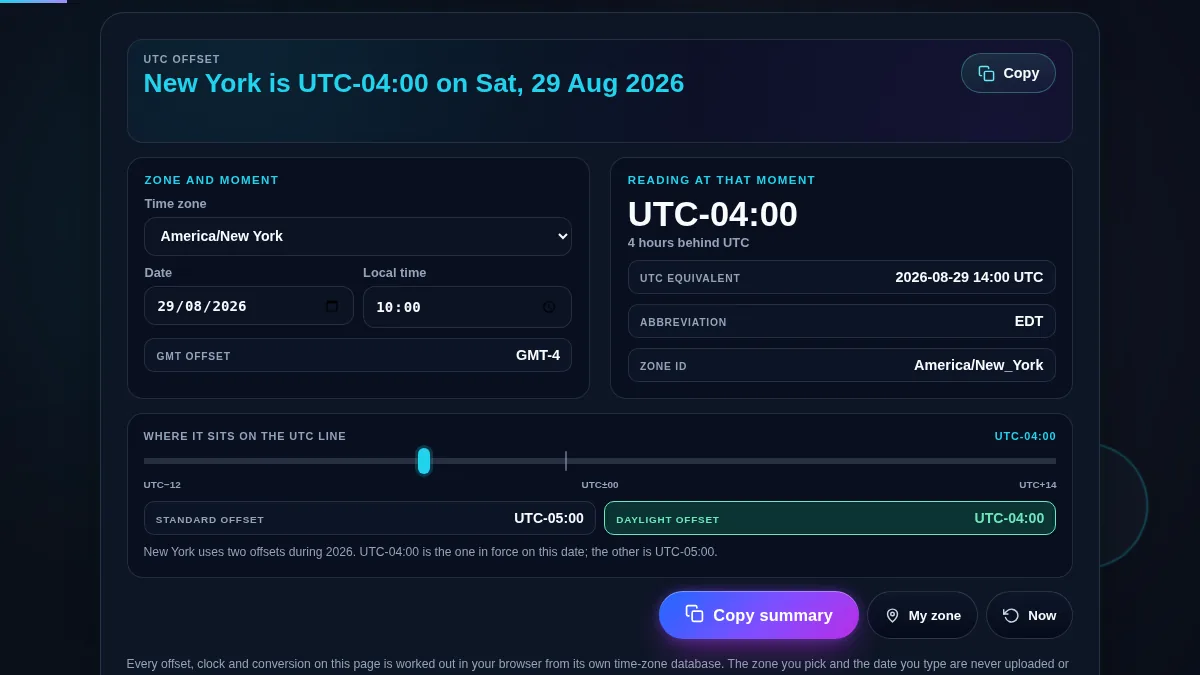
    Full time zone offset finder workspace: the offset sentence across the top, a panel with the zone selector and the date and time fields, a reading panel with the signed UTC offset, UTC equivalent, abbreviation and zone id, and below them the UTC-12 to UTC+14 line with its marker and the standard and daylight offset rows
    The whole tool on one screen: the offset in words, the readings it comes from, and where it sits on the UTC line.

    What Each Reading On The Page Means

    ReadingWhat it tells youWhere it comes from
    The sentence at the topThe zone's offset on the date in the field, in wordsThe long offset name for that zone at that instant
    UTC offsetThe signed figure, to the minute, such as UTC+05:45The same reading, written as hours and minutes
    GMT offsetThe same gap in the shorter spelling systems ask forDerived from the offset; GMT+1 rather than GMT+01:00
    UTC equivalentThe clock time you typed, expressed in UTCThe instant those fields describe, formatted in UTC
    AbbreviationThe browser's short name for the zone, such as EDTThe short time zone name; a GMT-style fallback where there is none
    Standard and daylight offsetsBoth offsets the zone uses in that year, with the live one markedThe year probed on the 1st and 16th of every month
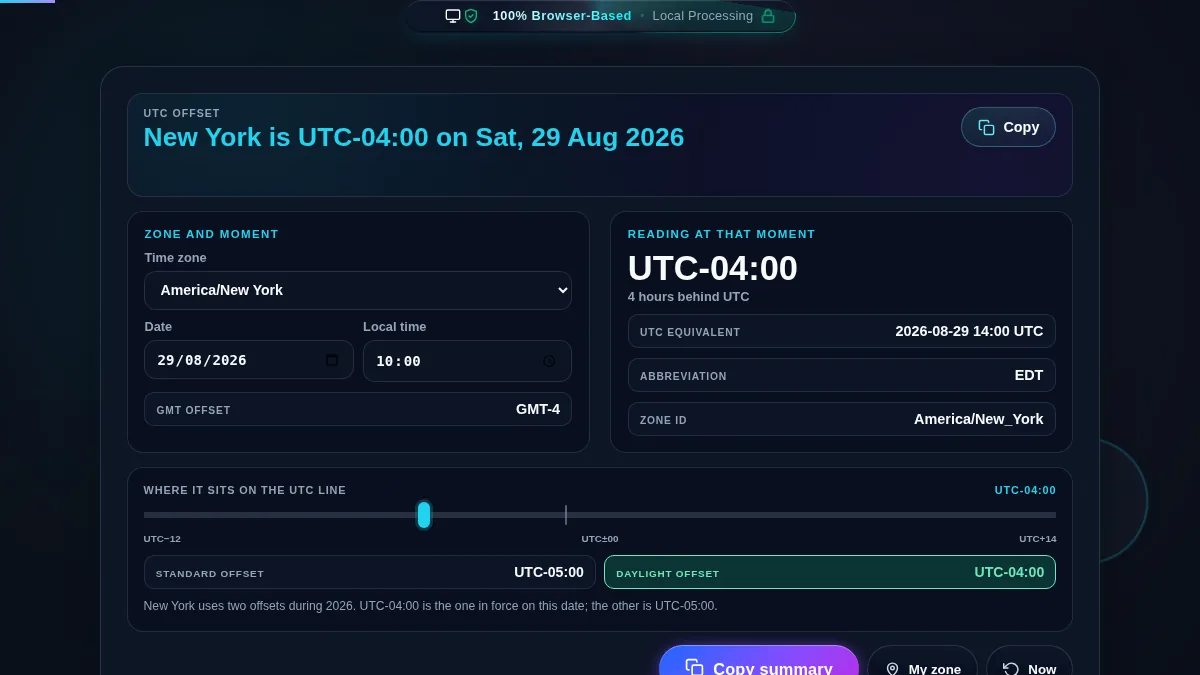
    The time zone offset finder set to a summer date for New York, with the standard offset and daylight offset rows shown side by side and the daylight one highlighted as the offset in force on that date
    A zone that changes its clocks has two offsets. The highlighted one is in force on the date you chose.

    How to Find a UTC Offset

    Four steps from a place name to a figure you can paste.

    Step 1: Choose the zone

    The selector opens on two dozen common cities and loads the full IANA list the moment you touch it, so Pacific/Chatham and Africa/Ouagadougou are both there. My zone jumps straight to the one your device reports. Zone ids are worth preferring over abbreviations in anything written down, because America/New_York is unambiguous where EST is not.

    Step 2: Set the date the answer is for

    The fields open on the current moment, so the first thing you see is the offset in force right now. Change the date to the day of the flight, the release, or the recurring call and the offset is recalculated for that instant. Changing the zone keeps the moment rather than the clock reading, which is what you want when the question is what the offset is there at the same time.

    Step 3: Check both offsets before you commit

    Under the UTC line are the two offsets the zone uses across that year, with the one in force highlighted. If both boxes carry a figure, the zone changes its clocks and anything recurring will move at some point in the year. If the daylight box says none, the zone stays put and one figure is good for every date. That single glance is the difference between a schedule that survives October and one that does not.

    Step 4: Copy the figure or the whole reading

    The Copy button in the top bar takes the sentence on its own, which is usually what belongs in a message. Copy summary takes everything: the zone id, the offset in both spellings, the local clock and its UTC equivalent, the abbreviation, both of the year's offsets, and the exact instant in ISO 8601. The ISO line is the one to hand a script or a calendar, because it carries no assumption about anybody's clocks.

    Frequently Asked Questions

    How do I find a time zone's UTC offset?

    Pick the zone from the selector. The bar at the top writes the answer as a sentence, the panel beside it gives the offset as a signed figure such as UTC+05:30, and the line underneath shows where that sits between UTC-12 and UTC+14. Nothing needs to be pressed. The date and time fields start on the current moment, so what you see first is the offset in force right now.

    Why does the same city have two different UTC offsets?

    Because most of Europe, North America, and parts of Australia and South America move their clocks twice a year. New York is UTC-05:00 in winter and UTC-04:00 in summer, so an offset quoted without a date is only half an answer. The tool samples the whole year for the zone you picked and prints both figures, marking which one is in force on the date in the field.

    Is a GMT offset the same thing as a UTC offset?

    For scheduling, yes, and the page prints both because different systems ask for different wording. UTC is the modern standard, defined by atomic clocks and kept within a second of the Earth's rotation, while GMT is the older astronomical time at the Greenwich meridian. They agree closely enough that GMT+1 and UTC+01:00 mean the same slot on a calendar.

    Can I check the offset for a date in the future?

    Yes, and this is the main reason to use the tool rather than a search result. Set the date and time to the day that matters and the offset is recalculated for that instant using the rules your browser holds. A call booked for late October in Europe or early November in the United States can be an hour away from where a today-only lookup would put it.

    Does it handle half-hour and 45-minute offsets?

    Yes. India sits at UTC+05:30, Nepal at UTC+05:45, Chatham Island at UTC+12:45, and parts of Australia are on half hours. The offset is read as hours and minutes and printed that way rather than rounded, which is the case that mental arithmetic and whole-hour tables get wrong.

    What is the abbreviation row showing?

    It is the short name your browser has for that zone at that moment, such as EST, EDT or BST. Where the browser has no letter abbreviation on file it falls back to a GMT-style name, and that is reported honestly rather than invented. Abbreviations are worth treating with care in writing anyway, because the same letters are reused by different regions.

    Is my data uploaded or stored anywhere?

    No. Every offset, clock and conversion on this page is worked out in your browser with JavaScript, using the time zone database your operating system already ships. The zone you pick and the date you type are never sent to Randomly.online, nothing is logged, and there is no account to create.

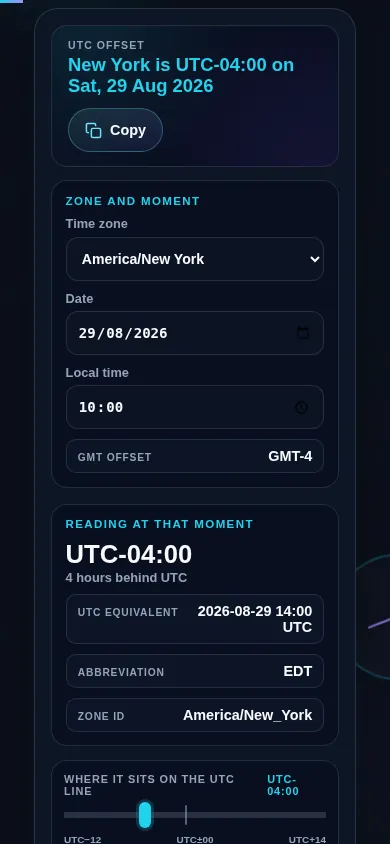
    Does the time zone offset finder work on a phone?

    Yes. On a narrow screen the zone and moment controls and the reading panel stack into one column with the offset sentence kept at the top, the UTC line keeps its full width with the marker in place, and the buttons spread across the width. Every control meets a 44px touch target.

    Time zone offset finder on a 390px phone: the offset sentence at the top, the zone, date and time controls and the reading panel stacked in a single column, and the UTC-12 to UTC+14 line with its marker below them
    The offset finder on a phone — one column, with the offset sentence kept at the top.

    Still have questions?

    If you can't find the answer you're looking for, feel free to contact our support team.

    Contact Us