Local Time to UTC

A Wall Clock Into One Universal Moment

100% Browser-Based Local Processing
In UTC
The local moment
The same instant in UTC
––:––:––  
Converted through
Date shift
Local reading
ISO 8601
Unix seconds
Unix milliseconds
SQL datetime

Every conversion, offset and timestamp on this page is worked out in your browser from its own time-zone database. The city list is a static file your browser reads directly. Nothing you type is uploaded or stored.

Privacy Focused

πŸ”’ Local Processing. The values you enter never leave your device.

Instant Results

🌐 Fully Client-Side. Runs instantly in your browser.

No Signup

⚑ No accounts. No API keys. Just open and use.

Browser Based

πŸš€ No installs, no sign-ups, no conversion limits.

One Instant, Written Four Ways

A wall clock time on its own is not a moment. "Nine on Tuesday" is a different point in history depending on whether it was said in Denver or in Dhaka, and the gap between the two readings is not even fixed — it depends on the date, because clocks move. UTC exists to end that argument: one timeline, no seasons, no local politics. Converting into it is the step that makes a time safe to put in a calendar, a payload, or a database column.

This tool takes the date, the clock reading and the place, and returns the instant. The offset it converts through is read from your browser's own time zone database for that exact moment rather than looked up in a stored table, so 9 AM in New York goes through UTC-04:00 in August and UTC-05:00 in January without you having to remember which.

The answer then comes out in the four shapes it actually gets asked for: ISO 8601 for anything crossing a network, Unix seconds for logs and cron, Unix milliseconds for JavaScript, and a plain datetime for a SQL column. For the journey back, use the UTC to Local Time converter; to see what offset a zone is on before you convert, the Time Zone Offset Finder.
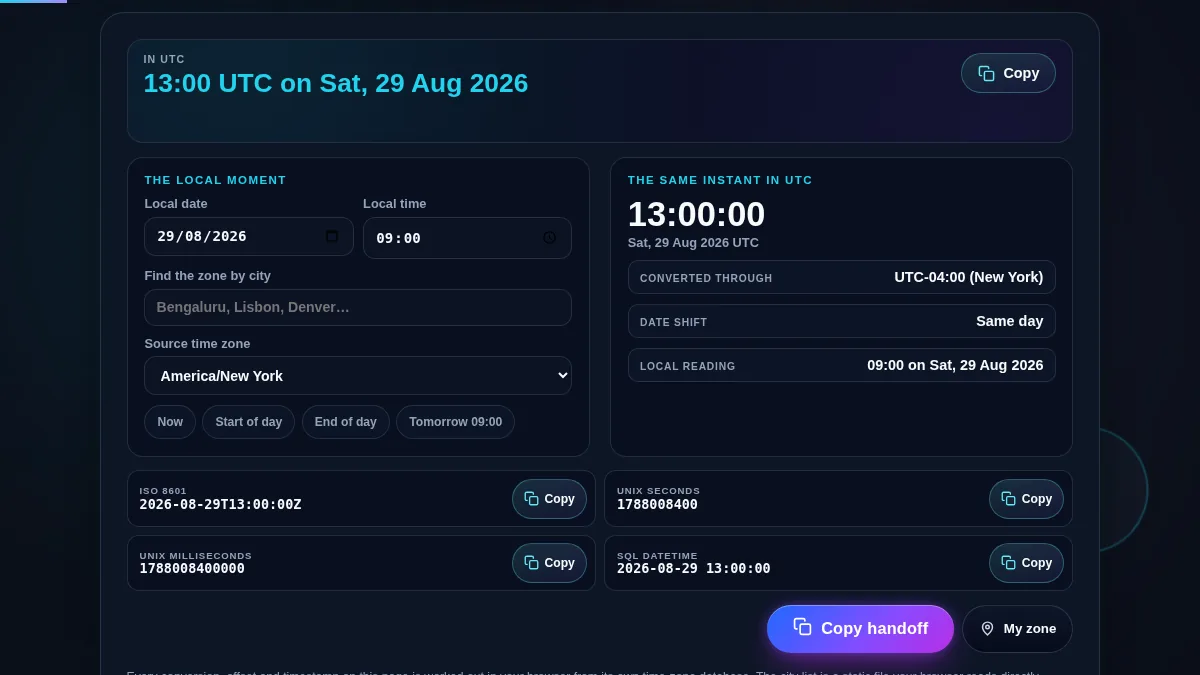
Full local time to UTC converter workspace: the UTC answer across the top, an input panel with the date, time, city search, zone selector and preset buttons, a result panel with the UTC clock, the offset it converted through and the date shift, and the ISO 8601, Unix seconds, Unix milliseconds and SQL rows with their copy buttons
The whole tool on one screen: the local reading, the instant it becomes, and the four formats that instant gets asked for in.

Which Format Goes Where

FormatLooks likeUse it for
ISO 86012026-08-29T14:00:00ZJSON payloads, REST and webhooks, anything crossing a network. The trailing Z states the zone, so nothing has to be assumed at the other end.
Unix seconds1787061600Server logs, cron, cache expiry, and most back-end languages. An integer, so it sorts and subtracts without a parser.
Unix milliseconds1787061600000JavaScript Date values, browser metrics, and anything talking to them. The same number a thousand times larger, and confusing the two is a common bug.
SQL datetime2026-08-29 14:00:00A column that stores UTC. No zone marker, which is exactly why the column itself must be documented as UTC.
Date shiftSame, next or previous dayReading before you send. A conversion can be correct and still land the invitation on the wrong calendar day.
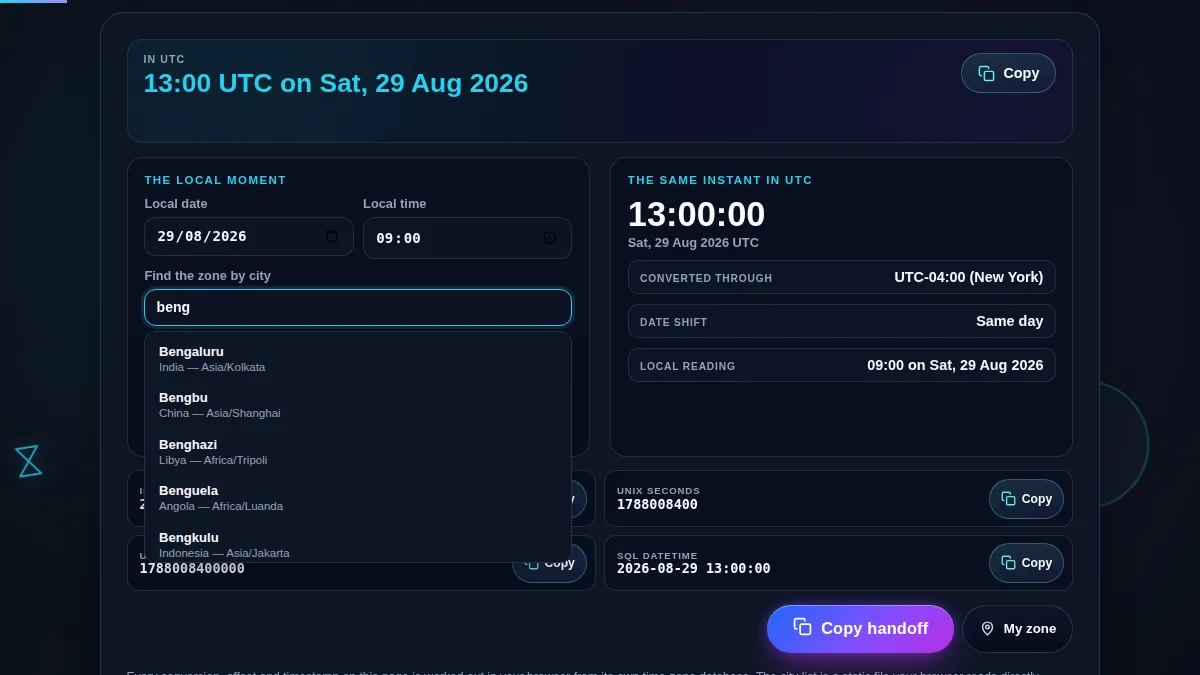
The local time to UTC converter with the city search open, a partial place name typed into it, and the matching cities listed underneath, each row showing the city name, its country and the IANA time zone that picking it will set
Nobody says a meeting is at 9 AM Asia/Kolkata. The city search exists so you do not have to translate that yourself.

How to Convert Local Time to UTC

Four steps from a wall clock to something you can paste.

Step 1: Enter the local date and clock time

The fields open on the current moment in the selected zone. Type the reading exactly as it was given to you, in that place's own terms. The date is not decoration: it is what decides which offset the conversion goes through, and it is the difference between a correct answer in August and a correct answer in January.

Step 2: Say where that clock is

Type two letters of a city and pick it from the list, or choose the IANA zone directly if you already know it. Changing the zone keeps the clock reading rather than the instant, because the question being asked is "the same nine o'clock, but in Denver". My zone sets it to whatever your device reports. The city list is the same twenty-thousand-city file the world clock uses, fetched only once you touch the field and cached after that, and it matches on alternative names as well, so Bombay finds Mumbai.

Step 3: Read the date shift before you send anything

The row that says same day, next day or previous day is the one people skip and then regret. A 22:00 meeting in Sydney is still the same afternoon in UTC terms, while a 20:00 call in Los Angeles has already crossed into the next UTC day. The conversion is right either way; what goes wrong is the calendar entry written from it. Check that row, then write the date the row gives you.

Step 4: Copy the shape the receiving system wants

Each format has its own copy button, so there is no editing down a blob to get the one line you needed. Copy handoff takes the lot as plain text, with the original local reading kept at the top so whoever reads it can check the conversion rather than trust it. That is the version to paste into a ticket, a release checklist or an incident note.

Frequently Asked Questions

How do I convert a local time to UTC?

Type the date and clock time, then say where that clock is: search a city, or pick the IANA zone directly. The bar at the top writes the UTC answer, the panel beside it repeats the local reading and the offset it was converted through, and the four developer formats underneath fill in at the same time. Nothing needs to be pressed and nothing is submitted anywhere.

Can I search by city instead of a time zone name?

Yes, and it is usually the faster way in. Type two or more letters and the matching entries appear with their country and their IANA zone; picking one sets the zone. It searches twenty thousand cities together with their countries, their zone ids and their alternative names, so Bombay finds Mumbai and Peking finds Beijing. Nobody says a meeting is at 9 AM Asia/Kolkata, they say 9 AM in Bengaluru, and the search exists so you do not have to translate that yourself.

Does it handle daylight saving time?

Yes, and it is the reason the date field matters. The offset is read from your browser's own time zone database for the exact instant you typed, not from a stored number, so 9 AM in New York converts through UTC-04:00 in August and UTC-05:00 in January. That is also why a recurring call booked in one season can be an hour out in the next.

Why does the UTC date sometimes differ from the local date?

Because a zone far enough from UTC pushes the same instant onto a different calendar day. Early morning in Tokyo is still the previous UTC day, since 07:00 there is 22:00 the evening before in UTC, and a late evening call in Los Angeles has already crossed into the next UTC day. The date shift row says same day, next day, or previous day so the difference is never a surprise in a calendar invitation.

Which output format should I use?

ISO 8601 for anything crossing a network, because the trailing Z makes the zone explicit and every language parses it. Unix seconds for logs, cron and most server code, and Unix milliseconds where JavaScript Date values are involved. The SQL form is the same instant written as a plain datetime literal for a column that stores UTC.

Should software store local time or UTC?

Store the instant in UTC and convert for display. A local time without a zone is ambiguous, and during the autumn changeover it is genuinely ambiguous twice over, because the same wall clock hour happens twice. The one thing worth storing alongside UTC is the original zone id, since some rules, such as recurring meetings, need to follow the local clock rather than the instant.

Is my data uploaded or stored anywhere?

No. Every conversion, offset and timestamp on this page is worked out in your browser with JavaScript. The city list is a static file served from this site and read by your browser alone; the time you type and the zone you choose are never sent to Randomly.online, nothing is logged, and there is no account to create.

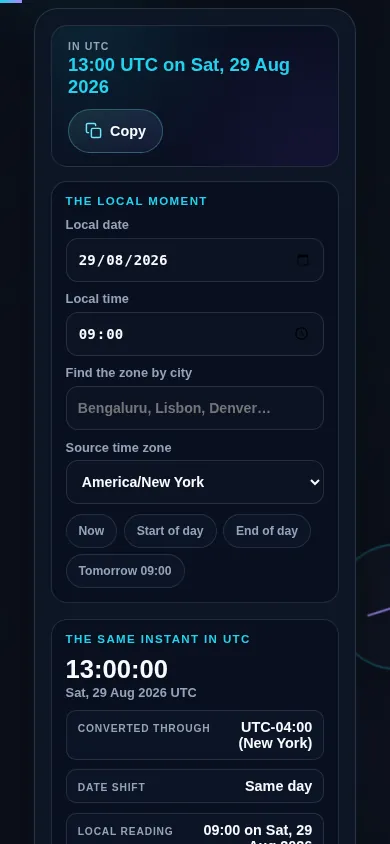
Does the local time to UTC converter work on a phone?

Yes. On a narrow screen the input panel and the UTC result stack into one column with the answer kept at the top, the four developer formats become a single column of full-width rows each with its own copy button, and the preset buttons wrap. Every control meets a 44px touch target.

Local time to UTC converter on a 390px phone: the UTC answer at the top, then the local date, the local time, the city search and the source zone stacked in one column, with the preset buttons wrapping underneath them
The converter on a phone — one column, with the UTC answer kept at the top.

Still have questions?

If you can't find the answer you're looking for, feel free to contact our support team.

Contact Us