🔒 Local Processing. Your code never leaves your device.
Instant Results
🌐 Fully Client-Side. Runs instantly in your browser.
No Signup
⚡ No accounts. No API keys. Just open and use.
Browser Based
🚀 No installs, no CLI, no build step.
Overview
Understanding HMAC Generation
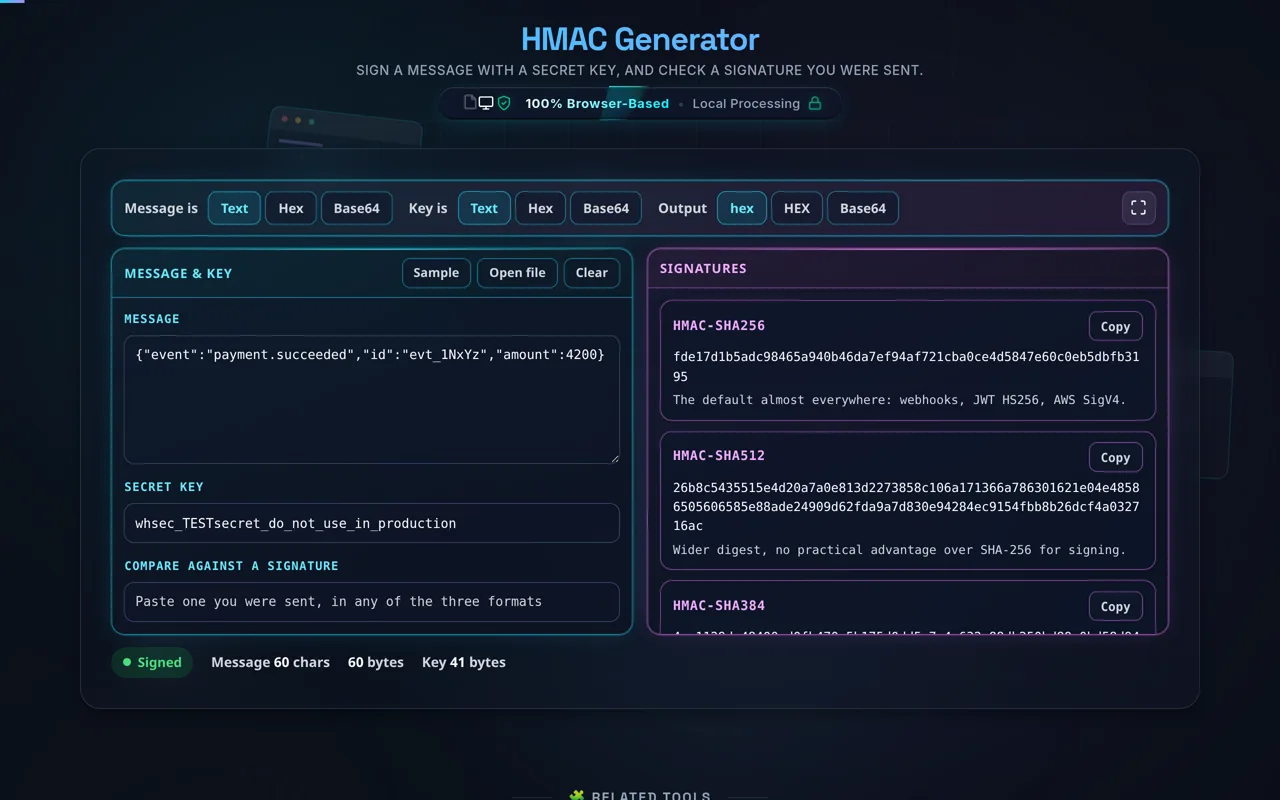
Direct answer: An HMAC is a short code that proves a message came from someone holding the same secret key, and that nobody altered it on the way. Type a message and a key here and five signatures appear as you type: HMAC-SHA256, SHA-512, SHA-384, SHA-1 and MD5, in lowercase hex, uppercase hex or Base64. Paste a signature you were sent and the page tells you which algorithm produced it. Four of the five come from your browser's own WebCrypto. Nothing is uploaded.
A plain hash proves only that the bytes did not change, and anyone can recompute one — that is what our Hash Generator does. An HMAC folds a secret key into the same hash function, so only the two parties holding that key can produce the code or check it. This is why Stripe, GitHub and AWS sign their webhooks with HMAC-SHA256 and put the result in a request header. If the header does not match what you compute, drop the request.
There is no algorithm to choose. All five are computed on every keystroke, because the common question is not "what is the SHA-256 of this" but "which of these did the other end use". A JWT signed with HS256 is an HMAC-SHA256 over the token's header and payload; the JWT Decoder splits a token into those parts and this page signs them. The key never leaves the tab: there is no request to send it in, and once the page has loaded it works with the network off.
Cyan is what you gave it, magenta is what it signed — all five algorithms at once, no selector
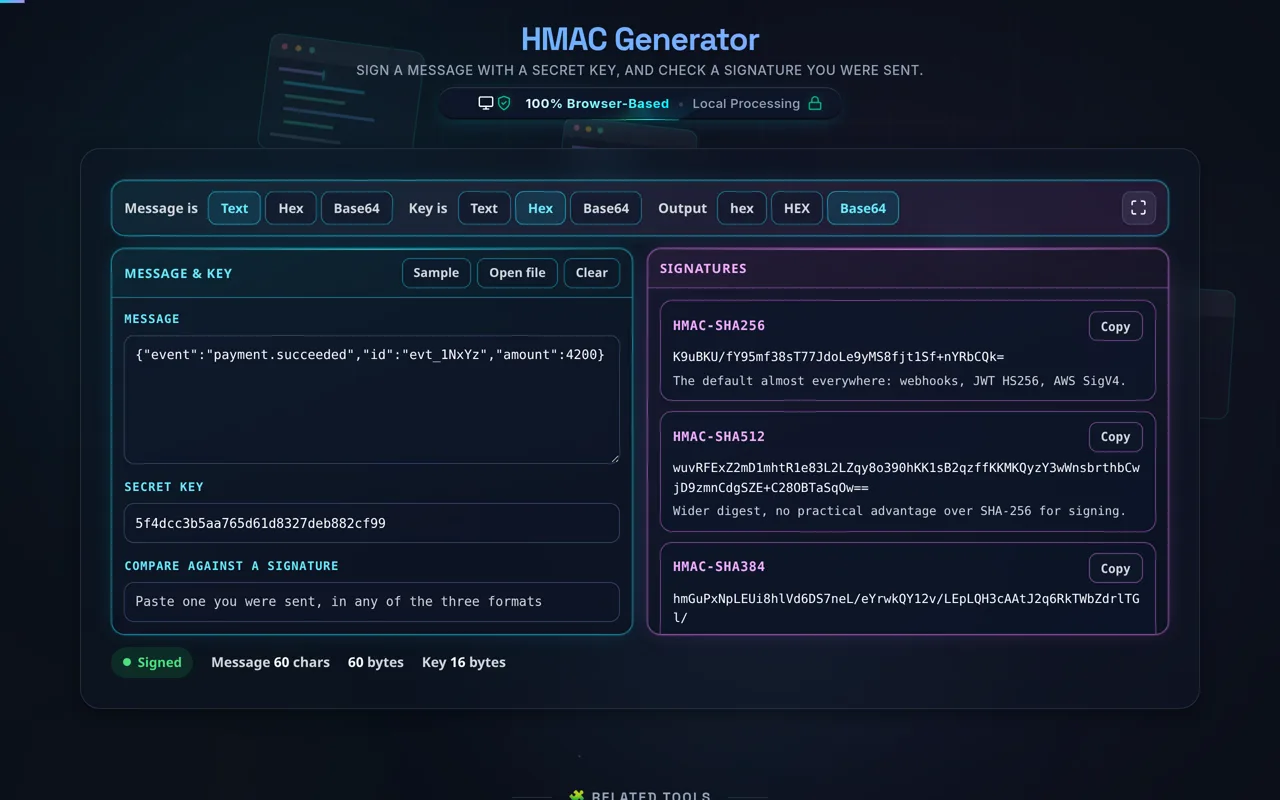
The two encoding rows are where signatures go wrong. A hash function does not sign text, it signs bytes. A secret handed to you as Base64 has to be decoded to its bytes before it is used, so set Key is to Base64 rather than typing the characters in as text; the same applies to a hex key, and to a payload that arrives as hex. Get it backwards and the digest is perfectly correct for something the other end never signed. That is usually the bug. Drop a file on the message pane and the file's own bytes are signed, not a UTF-8 re-reading of them — the distinction matters for anything that is not plain text, because re-reading turns every invalid sequence into U+FFFD. For the conversions on either side, see the Base64 Encoder and the URL Encoder.
A key given as hex, signatures asked for as Base64. Both sides are settings, not labels
Guide
How to Use the HMAC Generator
Put in the message
Type or paste it into the Message box, or press Sample for a webhook payload and a test secret. To sign a file, use Open file or drop it anywhere on the left pane: the file's bytes are signed exactly as they are stored, which is the only way a signature over a PDF or an image can match. Signing runs on every keystroke. There is no Generate button.
Enter the secret key
The Secret key field takes the shared secret — the value a provider calls a signing secret, a webhook secret or an API secret. It is used in the tab and nowhere else: no request carries it, and the page keeps working with the network off. If you need to create one rather than check one, the Password Generator produces high-entropy strings, and the UUID Generator is the usual source of a request id to sign alongside it.
Say how each side is encoded
The Message is and Key is rows switch between Text, Hex and Base64, and they are real settings rather than labels. A Base64 secret set to Text is signed as the 44 characters of the Base64 string instead of the 32 bytes it stands for, and the result will never match the provider. Hex input ignores spaces, colons and dashes, so a dump pasted as de:ad:be:ef works as it stands. If the payload is JSON you are inspecting elsewhere, the JSON Formatter shows the exact bytes before you sign them — formatting changes the message, and therefore the signature.
Read the five signatures
The right pane lists HMAC-SHA256, SHA-512, SHA-384, SHA-1 and MD5, each with a note on where it is still used. The Output row rewrites all five at once as lowercase hex, uppercase HEX or Base64: many APIs send lowercase hex, Stripe among them, while others send Base64. Copy on a card copies that digest alone. A plain unkeyed checksum of a file is a different job, and the File Hash Generator does it.
Check a signature you were sent
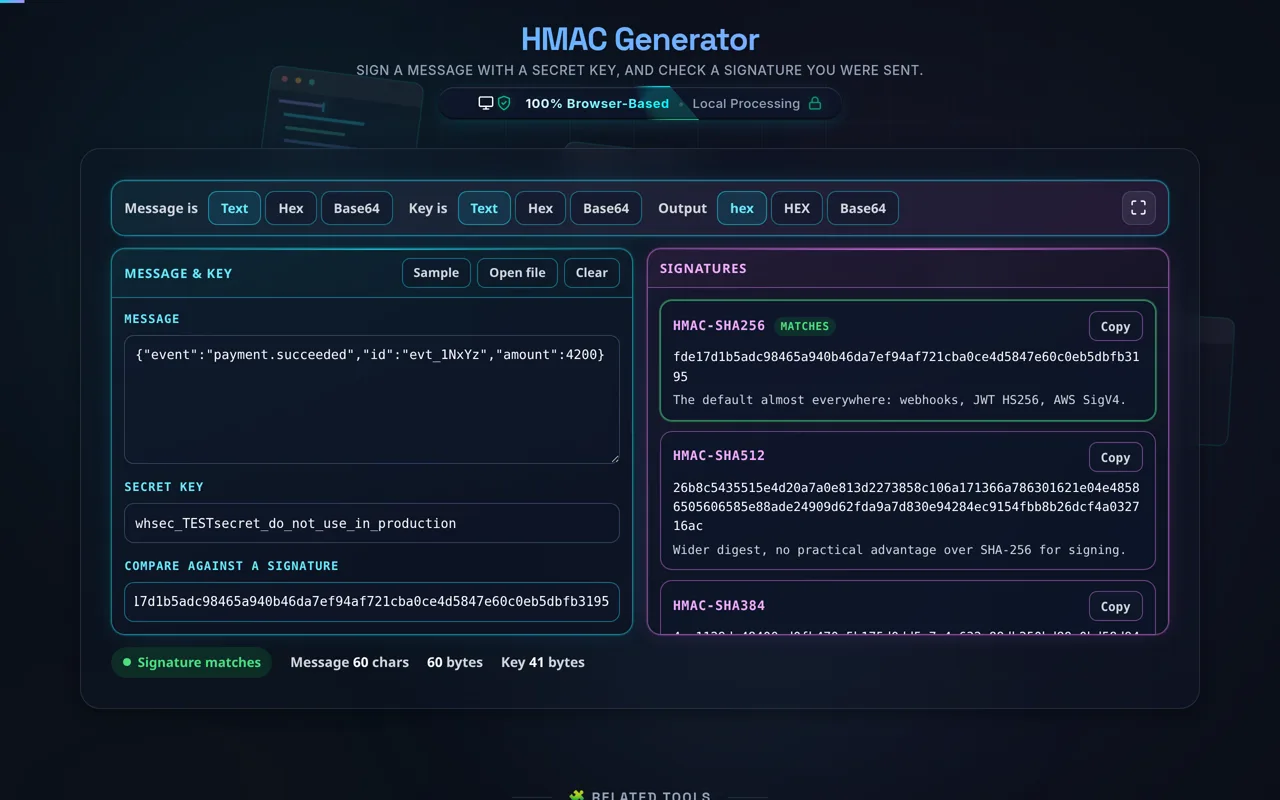
Paste it into Compare against a signature. The comparison is made on bytes, not on text, so a signature in uppercase hex still matches one displayed in lowercase, and a Base64 signature matches while the output is set to hex. The card that produced it gets a green outline and a MATCHES badge, and the status line names the result — which tells you the algorithm the other end used when the documentation does not.
Paste what you were sent and the card that produced it says so — here, HMAC-SHA256
Why a signature does not match
Four causes, in the order they occur. The encoding is wrong on one side: a Base64 or hex secret signed as text is the most common, and it is silent, because the wrong answer is still a valid HMAC. The message is not byte-identical: re-serialised JSON, a pretty-printed payload, a trailing newline added by an editor, or a body read after a framework has parsed and re-encoded it — sign the raw body a provider sent, not your object graph. The algorithm is not the one you assumed: paste the signature here and let all five compete; whichever card lights up is the answer. The secret has been rotated: HMAC cannot tell you that, but a mismatch on every algorithm at once is what it looks like.
Support
Need a hand?
Still have questions?
If you can't find the answer you're looking for, feel free to contact our support team.
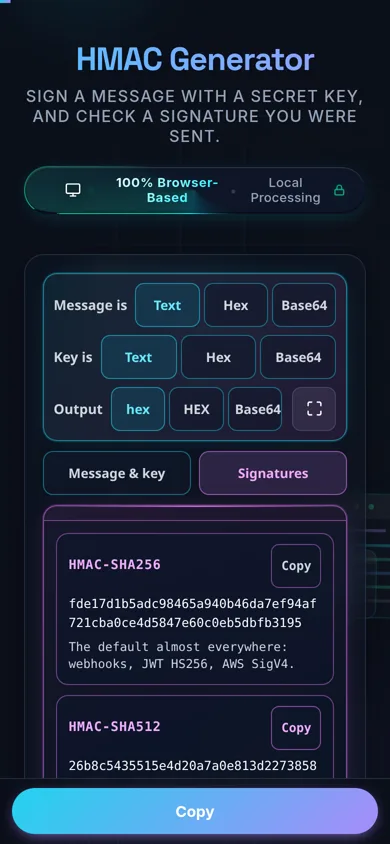
On a phone the two panes become a tab strip, and the encoding rows stack rather than scroll
How do I generate an HMAC?
Enter your message and your secret key. All five signatures appear as you type — HMAC-SHA256, SHA-512, SHA-384, SHA-1 and MD5 — so there is no algorithm to pick, and the Output row shows them as lowercase hex, uppercase hex or Base64. To check a signature you were sent, paste it into the Compare against a signature field: the card that produced it is outlined in green and badged, which also tells you which algorithm the sender used. Everything happens in your browser; your message and key are never uploaded.
Does this upload my message or key, and does it work offline?
No upload, and yes it works offline. Both the message and the secret key are processed in your browser using the Web Crypto API — there's no server involved, no logging, and no tracking. That's important because a leaked key breaks HMAC entirely. Once the page has loaded it keeps working with no internet connection, so your key stays on your device.
What is an HMAC, and how is it different from a plain hash?
A plain hash fingerprints a message with no secret. An HMAC hashes the message together with a secret key, so only someone holding that key can produce (or verify) the correct code. That extra ingredient turns a fingerprint into proof of authenticity — evidence the message came from a key-holder and wasn't altered — which a plain hash alone can't provide, since anyone can hash anything.
What does the secret key do?
The key is what makes an HMAC trustworthy. Because the code depends on both the message and the key, an attacker who changes the message can't recompute a valid HMAC without the key. Both sender and receiver share the same secret; the sender attaches the HMAC, and the receiver recomputes it with their copy of the key to confirm the message is genuine and unmodified.
Which algorithm should I use?
Use HMAC-SHA256 unless a system you're integrating with requires something else. It's the modern standard, widely supported, and secure. SHA-384 and SHA-512 offer longer digests if you need them. Only reach for HMAC-SHA1 or HMAC-MD5 to match a legacy system that mandates them — while HMAC hardens those older hashes considerably, they're not the choice for new designs.
Is HMAC encryption?
No. HMAC is authentication, not encryption — a common confusion. It proves a message is authentic and unchanged, but it does not hide the message: the content remains fully readable to anyone who sees it. If you need to keep the message secret, you must encrypt it separately. Think of HMAC as a tamper-evident seal, not a locked box.
Is HMAC-MD5 or HMAC-SHA1 safe?
They're stronger than the bare hashes, because the HMAC construction is resistant to the collision attacks that break plain MD5 and SHA-1. That means an existing system using HMAC-MD5 or HMAC-SHA1 isn't immediately broken. But they're legacy: for any new design, use HMAC-SHA256 or better. Only select MD5 or SHA-1 here to interoperate with something that already requires them.
How do I verify a webhook or API signature?
Take the raw payload as the message and your webhook's signing secret as the key, then compute the HMAC using the exact algorithm and encoding the provider specifies (often HMAC-SHA256 in hex or Base64). Paste the signature from the request header into the expected-HMAC field. A match confirms the request is genuine and untampered; a mismatch means you should reject it.
What output formats are supported?
Lowercase hex, uppercase hex, and Base64. Which one you need depends on the system you're matching: many APIs send signatures as lowercase hex, Stripe among them, while others send Base64. Pick the format the provider uses and the values line up character for character. You do not have to: the Compare against a signature field decodes what you paste and compares the underlying bytes, so a Base64 signature still matches a digest displayed in hex.
What does an HMAC actually protect against?
Tampering and impersonation. Because a valid HMAC requires the secret key, an attacker can't alter the message and produce a matching code, and can't forge a message that appears to come from a legitimate key-holder. It gives you integrity (the message wasn't changed) and authenticity (it came from someone with the key). It does not provide confidentiality — that requires encryption.
Where should I keep the secret key?
Somewhere secret and out of your codebase — an environment variable, a secrets manager, or a secure vault — never hard-coded in client-side code or committed to Git. Since anyone with the key can forge valid HMACs, its secrecy is the entire security of the scheme. Rotate it if you suspect exposure. This tool never stores or transmits the key; it only uses it locally to compute the code.
Is it free, and are there limits?
Yes, completely free — no payment, no signup, no account, and no usage caps or watermarks. Since everything runs in your browser, there's nothing for us to meter; the only practical limit is your device's performance on very long messages. Use it as much as you like, including offline once the page has loaded.
Still have questions?
If you can't find the answer you're looking for, feel free to contact our support team.