🔒 Local Processing. Your code never leaves your device.
Instant Results
🌐 Fully Client-Side. Runs instantly in your browser.
No Signup
⚡ No accounts. No API keys. Just open and use.
Browser Based
🚀 No installs, no CLI, no build step.
Overview
About the Online Hash Generator
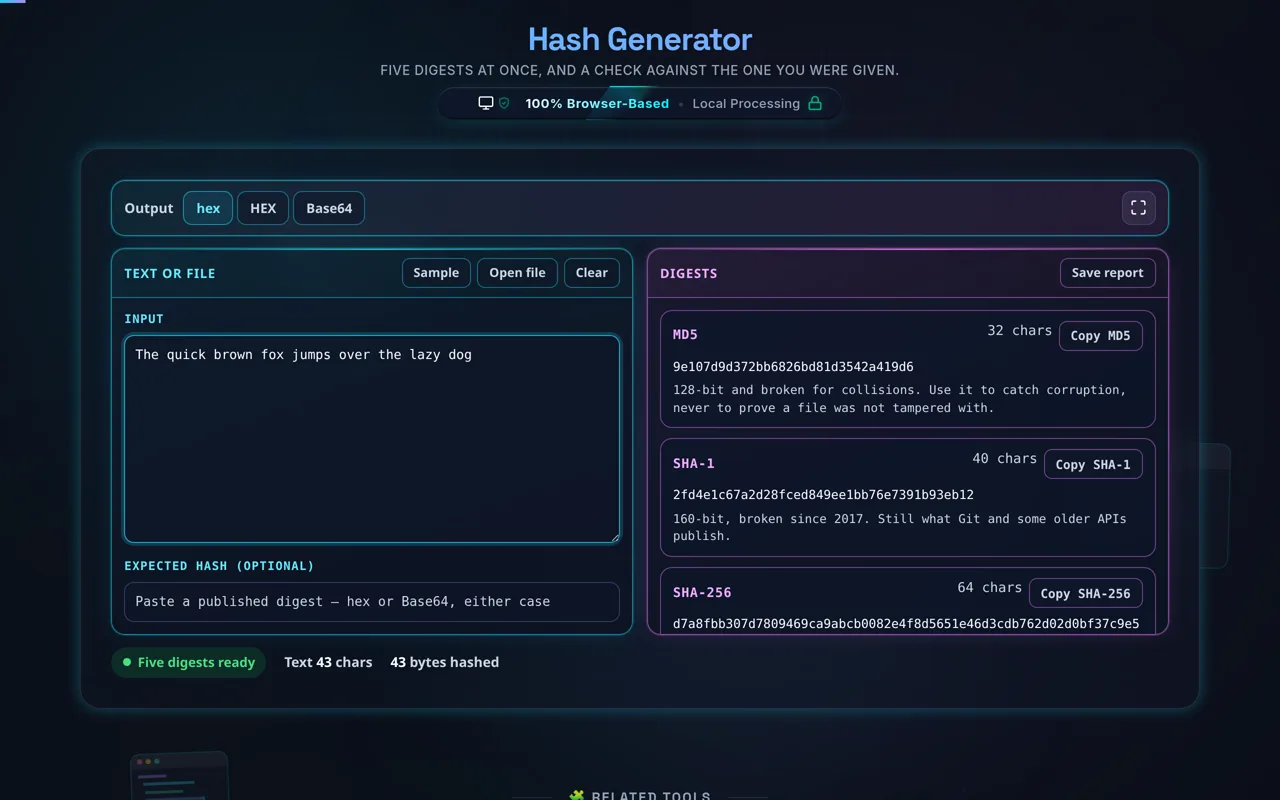
Direct answer: A hash is a short fixed-length fingerprint of some bytes: the same input always gives the same digest, any change gives a different one, and you cannot work backwards to the input. Type text or drop a file and five appear at once — MD5, SHA-1, SHA-256, SHA-384 and SHA-512 — in lowercase hex, uppercase hex or Base64. Paste the digest a publisher listed and the page tells you which of the five it is and whether it matches. Nothing is uploaded.
There is no algorithm to choose. All five are computed on every keystroke, because the question people arrive with is not "what is the SHA-256 of this" but "does this match the value on the download page". You rarely know which algorithm produced the string in your clipboard; paste it into Expected hash and the tool answers that as well as the digest itself. Four of the five come from your browser's own WebCrypto. MD5 is the one exception — WebCrypto deliberately omits it — so it is implemented in the page and checked against RFC 1321's published vectors.
Cyan is what you gave it, magenta is what it computed — all five algorithms at once, no selector
A file is hashed as bytes, not as text. Drop a zip, an iso or an installer on the input pane and the file's own bytes go into all five digests. That distinction is the whole game for a checksum: reading a binary file as UTF-8 and re-encoding it does not round trip, because every invalid sequence becomes U+FFFD, and the digest you get is of something the file never contained. If you routinely check large downloads, the File Hash Generator streams the file in chunks rather than holding it in memory. For the encodings on either side of a digest, see the Base64 Encoder / Decoder; for signing rather than fingerprinting, the HMAC Generator folds a secret key into the same hash functions.
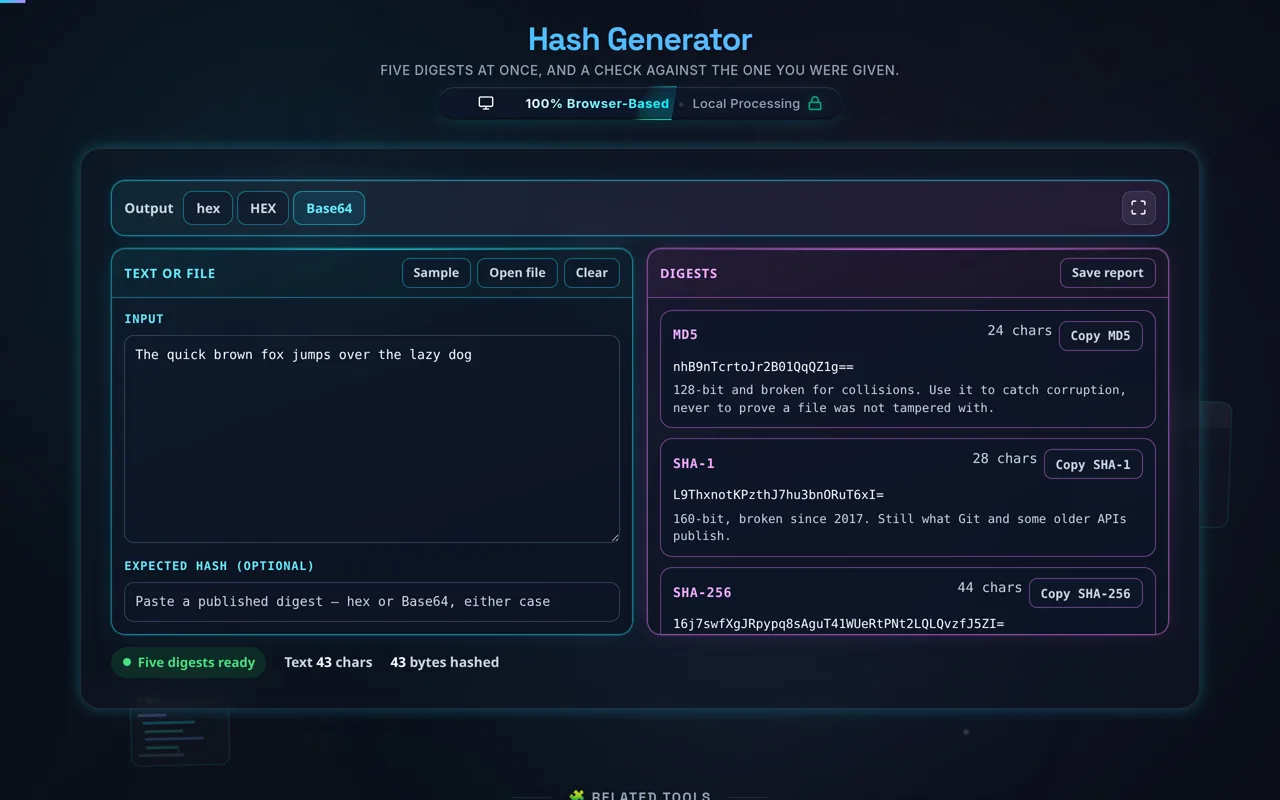
Hex and Base64 are the same bytes written two ways — switching re-prints the digests rather than hashing again
Guide
How to generate a hash
Step 1: Give it the bytes
Type or paste into the Input box in the cyan pane, or use Open file — or drop a file straight onto the pane. A file is read by your own browser and hashed as its own bytes; it is never uploaded. Sample loads a line of text with its MD5 already in the verify field, so you can see a match before you need one.
Step 2: Read all five digests
MD5, SHA-1, SHA-256, SHA-384 and SHA-512 appear together in the magenta pane as you type, each with its own character count and its own Copy button. There is nothing to select and no button to press. The status line under the panes counts the bytes that went in, which is the number that decides the digest.
Step 3: Switch the format if you need to
Output in the bar above the panes gives lowercase hex, uppercase hex and Base64. It re-prints the digests already computed rather than hashing again, so switching is instant however large the input was. If you need the encodings themselves rather than a digest in one of them, use our Base64 Encoder / Decoder.
Step 4: Check it against a published value
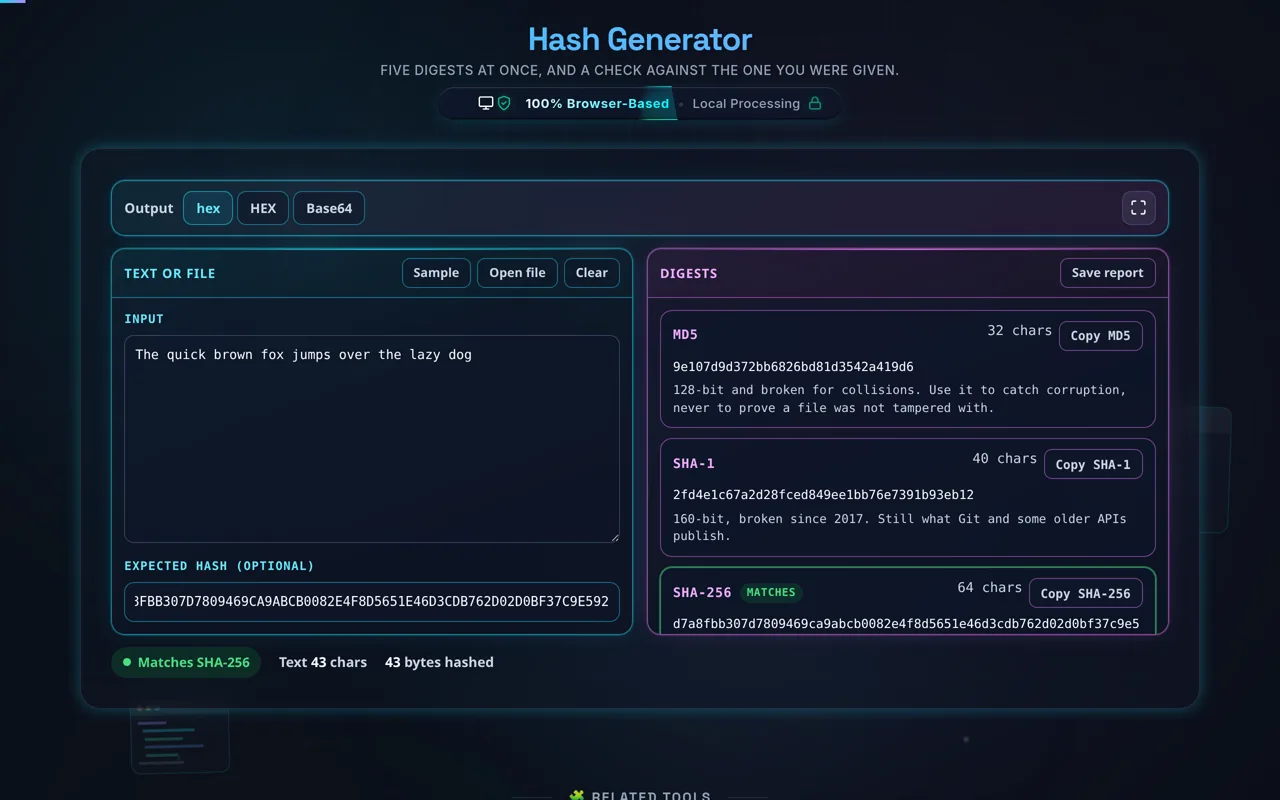
Paste what the publisher listed into Expected hash. It is compared as bytes, so lowercase hex, uppercase hex, a sha256: prefix, a colon-separated fingerprint and Base64 all work, and the status line names the algorithm that matched. Only that one card is marked — the other four are different algorithms, not failures.
One card is marked, not four — the other algorithms are different, not wrong
Step 5: Copy or save
Each card has its own Copy button, named for the algorithm it copies, and Save report writes all five digests, the byte count and the format to a text file. Both are built in the page; nothing is sent anywhere.
Support
Need a hand?
Still have questions?
If you can't find the answer you're looking for, feel free to contact our support team.
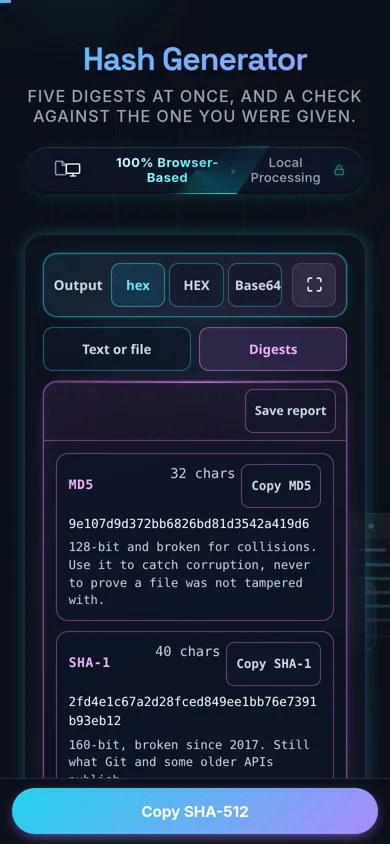
On a phone the two panes become a tab strip rather than a column of empty boxes
How do I generate a hash from text or a file?
Type or paste your text, or drop a local file on the input pane, and all five digests appear at once — MD5, SHA-1, SHA-256, SHA-384 and SHA-512. There is no algorithm to pick and no button to press. Switch the format between lowercase hex, uppercase hex and Base64 in the bar above, paste an expected hash to check it, then copy one digest or save the whole report. Everything happens in your browser; nothing is uploaded.
Does this upload my data, and does it work offline?
No upload, and yes it works offline. All hashing happens in your browser using the built-in Web Crypto API (and an in-page routine for MD5) — there's no server receiving your text or files, no logging, and no tracking. That matters when you hash a private file or string. Once the page has loaded it keeps working with no internet connection.
What's the difference between MD5, SHA-1, SHA-256, and SHA-512?
They're different hash algorithms producing different-length digests. MD5 is 128-bit and SHA-1 is 160-bit — both fast but cryptographically broken. SHA-256, SHA-384, and SHA-512 are part of the SHA-2 family and produce 256, 384, and 512-bit digests respectively, and remain secure. For a fingerprint you want to trust against a determined attacker, use SHA-256 or larger; MD5 and SHA-1 are fine only for casual integrity checks.
Can I decrypt or reverse a hash?
No — hashing is a one-way function by design. There's no key and no inverse: you cannot compute the original input from its hash. Sites that claim to "decrypt" a hash are really just looking it up in a precomputed table of common inputs (like leaked passwords), which only works for weak, well-known values. For any real input, the hash is irreversible, which is exactly what makes hashing useful.
Which algorithm should I use?
For anything security-sensitive, use SHA-256 (or SHA-384/SHA-512) — they're the current safe default. Use MD5 or SHA-1 only for non-security tasks like a quick checksum to catch accidental corruption, where speed matters and an attacker isn't in play. And remember: for storing passwords, no fast hash is appropriate — use a slow key-derivation function such as bcrypt, scrypt, or Argon2 instead.
Are MD5 and SHA-1 safe to use?
Not for security. Both are cryptographically broken: practical collision attacks exist, meaning an attacker can craft two different inputs with the same hash. That makes them unsafe for digital signatures, certificates, password hashing, or anything an adversary could exploit. They remain perfectly useful as checksums for detecting accidental changes or corruption, where nobody is deliberately attacking the hash. For everything else, choose SHA-256 or stronger.
How do I verify text or a file against an expected hash?
Enter your text or drop the file, then paste the published value into Expected hash. You do not have to know which algorithm produced it: the value is decoded to bytes and compared against all five, and the status line names the one that matched. Lowercase hex, uppercase hex, a colon-separated fingerprint, a sha256: prefix and Base64 all work, because the comparison is over bytes rather than characters. Only the matching card is marked — the other four are different algorithms, not failures.
What output formats are supported?
Hex in lowercase, hex in uppercase, and Base64. Hex is the most common way to display a hash (the long string of 0-9a-f you see on download pages), while Base64 is more compact and sometimes used in headers or tokens. Pick whichever matches the value you're comparing against — a mismatch in format, not content, is a frequent reason two hashes look different.
Why do I get a different hash than another tool?
Usually because the input differs, not the algorithm. Common causes: a trailing newline added by an editor, a different text encoding (UTF-8 vs UTF-16), different line endings (\n vs \r\n), or comparing a hex hash to a Base64 one. A file is the case to watch: it has to be hashed as its own bytes, and a tool that reads it as text first will disagree with every other tool on anything that is not plain UTF-8. This page hashes the bytes, and its MD5 is checked against RFC 1321's published vectors. Hash the same bytes and the digests match — the function is deterministic.
What is a hash actually used for?
Lots of things: verifying that a downloaded file arrived intact (checksums), detecting whether data has changed, deduplicating content by fingerprint, building cache keys and ETags, and — with the right construction — indexing or signing. Because the same input always yields the same fixed-length digest and any change alters it, a hash is a compact, reliable stand-in for "is this exactly the same data?".
Can it hash large files?
Usually yes, within your device's limits. Because hashing runs locally, the constraint is your browser's memory and CPU rather than a server cap. Small and medium files are near-instant; very large files take longer to read and process but are never uploaded. If you routinely hash big files, the dedicated File Hash Generator is optimized for that workflow.
Is it free, and are there limits?
Yes, completely free — no payment, no signup, no account, and no usage caps or watermarks. Since everything runs in your browser, there's nothing for us to meter; the only practical limit is your device's performance on very large inputs. Use it as much as you like, including offline once the page has loaded.
Still have questions?
If you can't find the answer you're looking for, feel free to contact our support team.