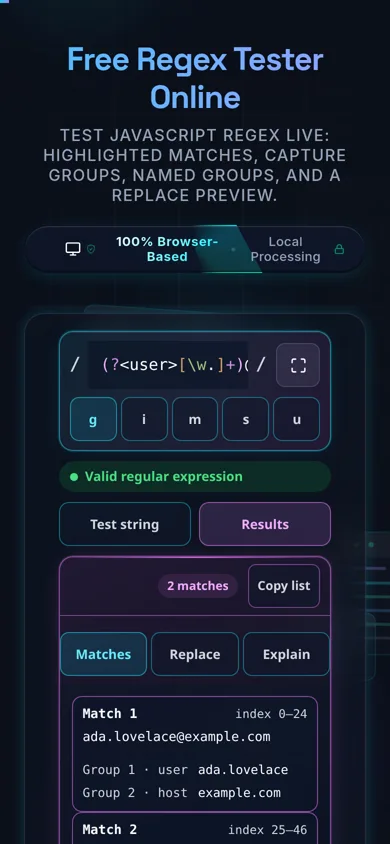
Free Regex Tester Online

Test JavaScript regex live: highlighted matches, capture groups, named groups, and a replace preview.

100% Browser-Based Local Processing
Regular Expression
/
/
Test String 0 matches

A basic heuristic breakdown of your regex will appear here.

Privacy Focused

🔒 Local Processing. Your code never leaves your device.

Instant Results

🌐 Fully Client-Side. Runs instantly in your browser.

No Signup

⚡ No accounts. No API keys. Just open and use.

Browser Based

🚀 No installs, no CLI, no build step.

Test, debug, and understand your regex — privately

A regex tester lets you type a regular expression and a sample text and see, live, exactly which parts match, what each capture group captured, and what a replacement would produce. This one runs your browser's own JavaScript (ECMAScript) engine locally — nothing is uploaded.

Regular expressions are dense by design. A pattern like ^(?<user>[\w.+-]+)@([\w-]+\.)+[a-z]{2,}$ is a few dozen characters that encode a lot of decisions, and reading it back is much harder than writing it. A regex tester closes that gap: you type the pattern, paste some realistic text, and the tool shows you the truth instead of your assumptions.

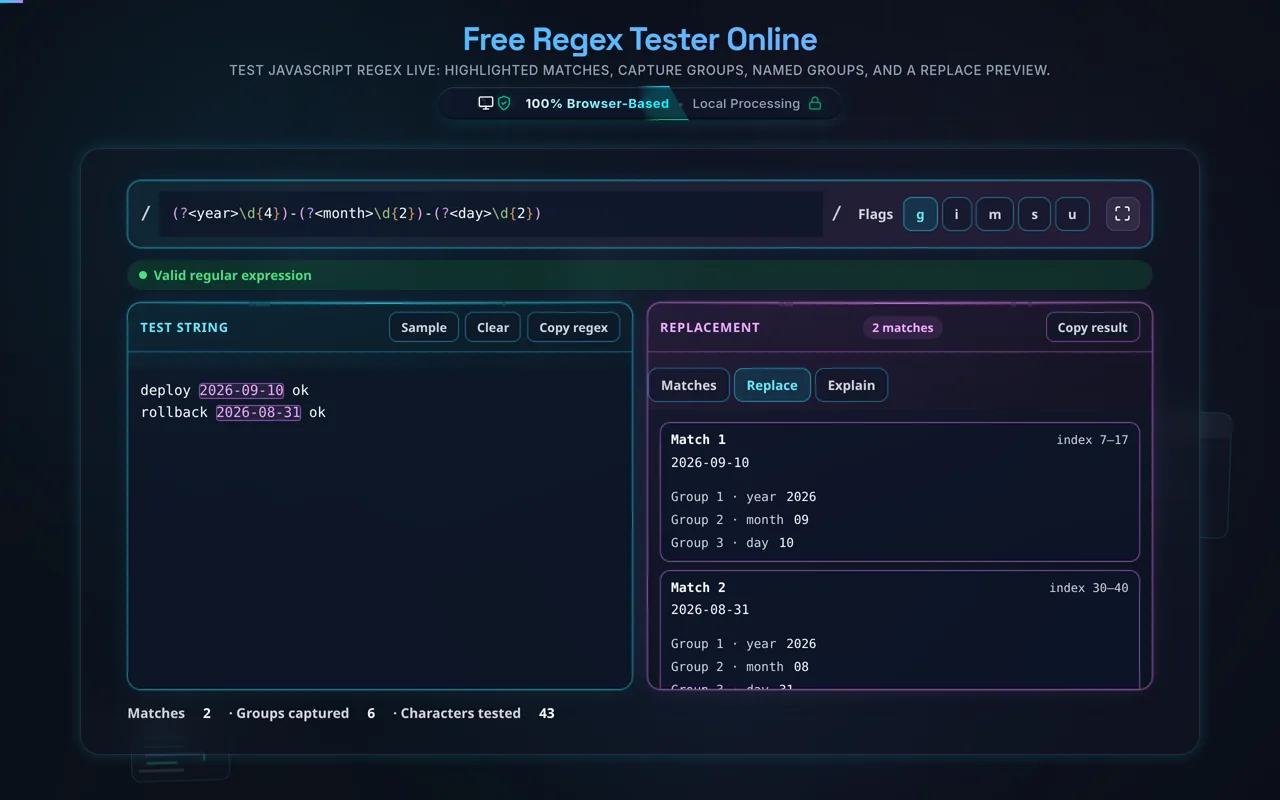
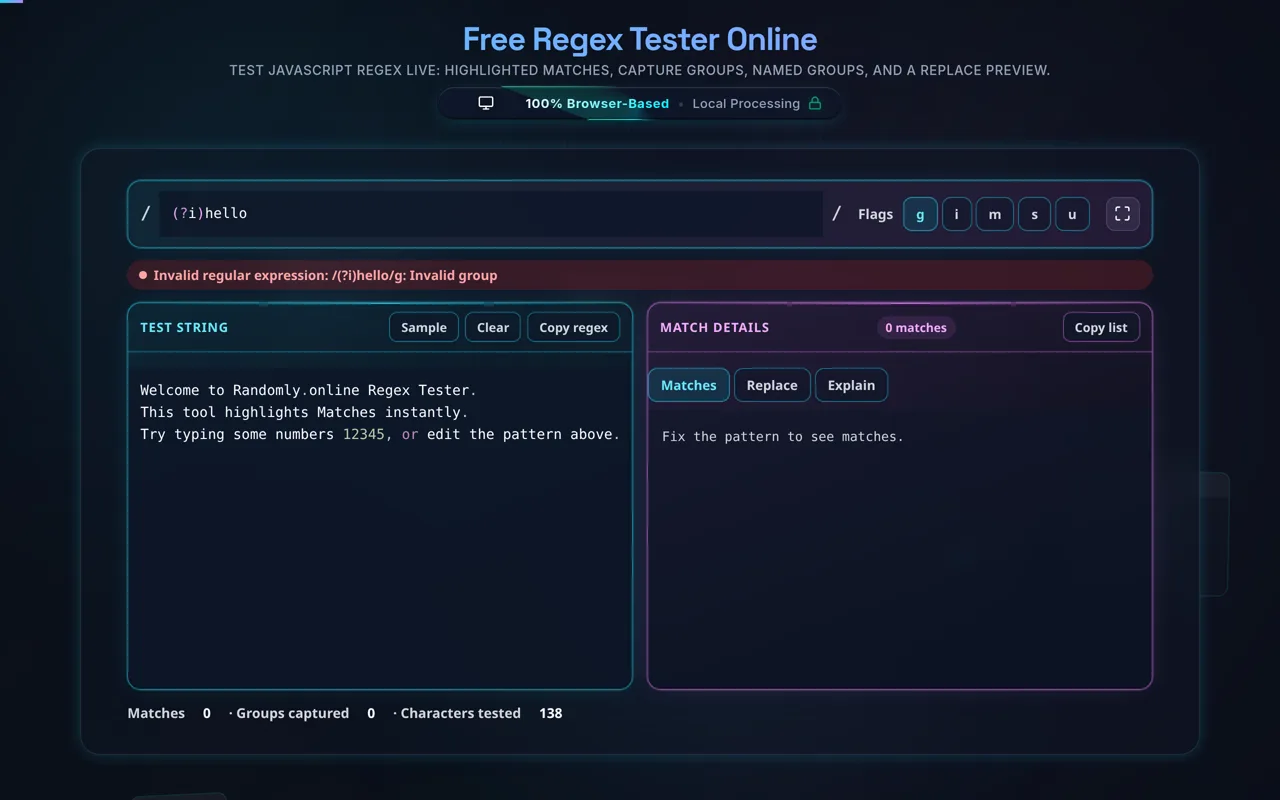
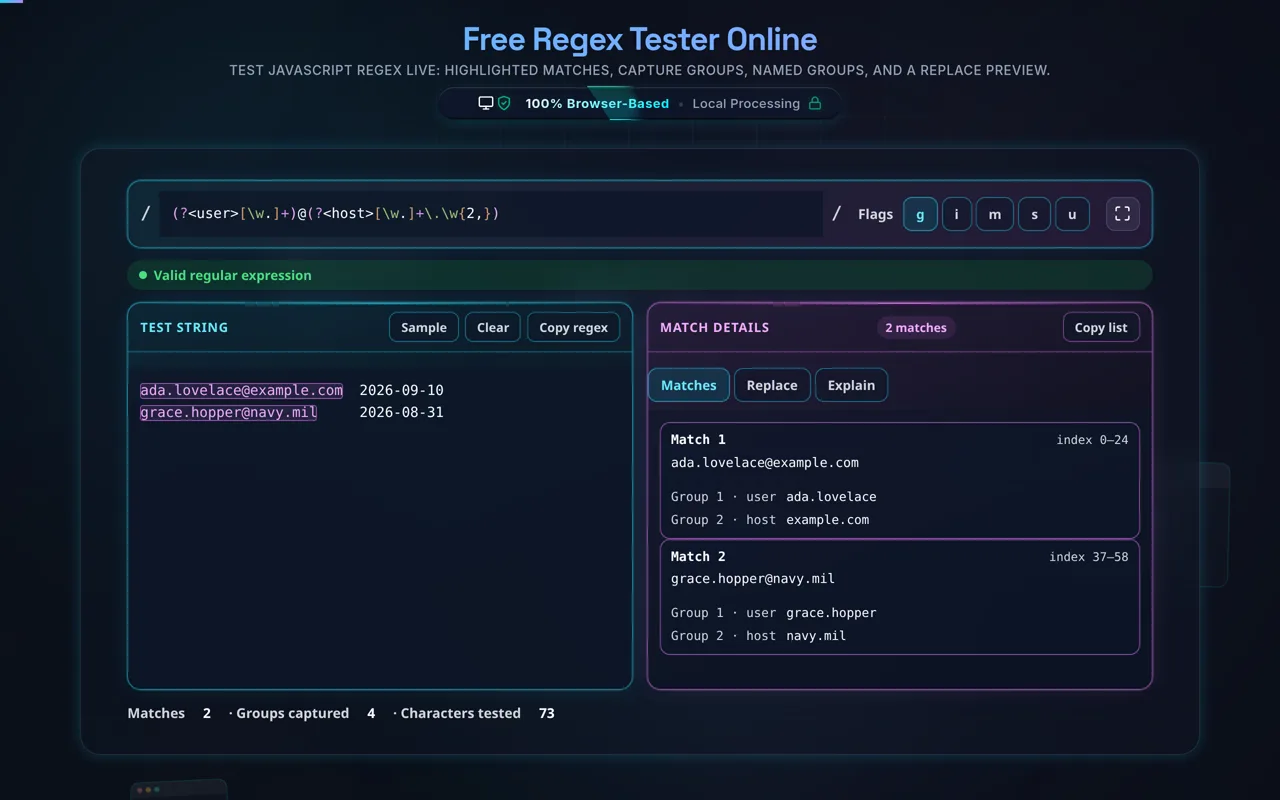
Type into the pattern editor and it compiles on every keystroke. A valid pattern gets a green confirmation; an invalid one gets the browser's own error message, so an unclosed group or a stray quantifier surfaces immediately rather than at runtime. Toggle the flags — g, i, m, s, u — and the results update instantly. Every match lights up in the test string, the badge counts them, and the Match Details tab breaks each one down: its start and end index, the matched text, every numbered capture group (including the ones that came back undefined), and every named group if you used (?<name>…) syntax. Switch to the Replacement tab, type something like $1-$2 or $<user>, and you see the transformed text before you commit it to code.
Everything happens in your browser. There is no server, no upload, no account, and no logging of what you paste. That matters more here than for most tools, because regex test strings are almost always real data — log lines, email addresses, API tokens, customer records, a slice of a database dump. On this page that data never leaves your device, and the tool keeps working offline once the page has loaded. You can confirm it in your browser's network tab.

One thing to be clear about up front: this tests the JavaScript flavor, and that is not the same as Python's or PCRE's. The next section explains exactly what that means for you.

Working with structured data too? See the JSON Formatter, CSV to JSON, and URL Encoder/Decoder.

When a regex tester helps

  • Extracting fields from logs. Prove the pattern catches every line shape before it runs at scale.
  • Validating input formats. Emails, slugs, SKUs, phone numbers — check the false positives too.
  • Building a find-and-replace. Preview $1/$<name> substitutions before running them over a codebase.
  • Debugging someone else's regex. Paste it, feed it real text, and watch where it actually lands.
  • Learning the syntax. Change one character, watch the highlights move.
  • Sensitive data. Test against real log lines or tokens without pasting them into a hosted service.

How to test a regular expression

Write your pattern

Type it into the editor between the / delimiters. It compiles as you type — a green message confirms it's valid, and an invalid pattern shows the browser's exact syntax error.

Set your flags

Toggle g (find all matches, on by default), i (case-insensitive), m (make ^ and $ match at line breaks), s (let . match newlines), and u (Unicode mode).

Paste your test string

Use realistic text, including the edge cases you expect to fail. Matches highlight instantly and the badge shows the count.

Inspect the match details

Each match lists its start and end index, the matched text, every numbered capture group, and any named groups from (?<name>…).

Preview a replacement, then copy

In the Replacement tab, type a substitution like $1-$2, check the output, then use Copy to grab the pattern as /pattern/flags.

Realistic example

With the pattern (?<year>\d{4})-(?<month>\d{2})-(?<day>\d{2}) and the g flag,

Advanced tip

Anchors behave differently per flag: without m, ^ and $ only match the very start

Common mistake to avoid

Don't paste a pattern copied from Python or PHP without checking it. Inline

Related

Cleaning up the output afterwards? Try the JSON Formatter or the

What to keep in mind

  • JavaScript flavor only. Patterns are compiled with the browser's RegExp. A green tick here says nothing about Python, PCRE, Go RE2, or .NET.
  • Five flags. g, i, m, s, and u are available. The sticky (y), match-indices (d), and Unicode-sets (v) flags are not offered here.
  • No backtracking protection. There is no timeout or worker isolation — a catastrophically backtracking pattern can freeze the tab.
  • The Explanation tab is a heuristic. It looks for common tokens and prints a short note for each. It does not parse your pattern, isn't aware of escaping, and won't describe structure or nesting.
  • Matches are capped at 5,000. Global patterns stop collecting there; the badge tells you when it happened.
  • Paste only. There's no file loader, and patterns aren't saved or shareable by link — copy them out before you close the tab.
  • Zero-knowledge and private. All evaluation runs in your browser. Nothing is uploaded, logged, or stored, and it works offline once loaded.
  • Local performance. Very long test strings are limited by your device's CPU and by rendering thousands of match rows, since there's no server.

Frequently Asked Questions

How do I test a regular expression online?

Type your pattern into the editor at the top, toggle the flags you need, then paste sample text into the test box below. Matches highlight instantly as you type, the badge counts them, and the Match Details tab breaks down each match with its index and capture groups. Nothing is submitted — it recompiles on every keystroke, entirely inside your browser.

Which regex flavor does this tester use — JavaScript, PCRE, or Python?

JavaScript (ECMAScript). Your pattern is compiled with the browser's built-in RegExp constructor, so results match exactly what you'd get in Node.js or a browser. There is no flavor selector and no translation layer. If you're deploying to Python, PHP/PCRE, Go, Java, or .NET, treat a green tick here as evidence about JavaScript only, and re-test in your target language.

Which flags are supported, and what do g, i, m, s, and u do?

Five are available. g finds every match instead of just the first (on by default). i makes matching case-insensitive. m makes ^ and $ match at each line break rather than only at the string's ends. s lets . match newline characters. u enables Unicode mode, which you need for \p{…} property escapes. The sticky (y), indices (d), and Unicode-sets (v) flags are not offered here.

Does this upload my pattern or test string, and does it work offline?

No upload, and yes it works offline. The pattern and the test text are evaluated by your browser's own regex engine — there's no server receiving them, no logging of content, and nothing stored. That makes it safe for real log lines, tokens, and customer data, which is what people actually paste into regex testers. Once the page has loaded it keeps working with no connection; check the network tab yourself.

How do capture groups work, and does this show named groups?

A capture group is any part of your pattern wrapped in parentheses, and the engine remembers what each one matched. Both kinds are shown here: numbered groups appear as Group 1, Group 2 and so on — with undefined shown explicitly when a group didn't participate — and named groups written as (?<name>…) are listed by name alongside them, for every match.

How do I preview a find-and-replace with $1, $&, and $<name>?

Open the Replacement tab and type your substitution string. Because the preview uses JavaScript's native String.replace, all its tokens work: $1 for the first numbered group, $<name> for a named group, $& for the whole match, ` $ ` and $' for the text before and after it, and $$` for a literal dollar sign. The result updates live, and Copy Output grabs it.

Why does my pattern work in Python or PCRE but not here?

Because those are different dialects. JavaScript rejects inline flags like (?i), Python's (?P<name>…) group syntax, \A and \z anchors, atomic groups (?>…), possessive quantifiers, recursion, and the free-spacing x flag — all of which are fine elsewhere. Translate to JavaScript equivalents: use (?<name>…) for named groups, ^/$ for anchors, and the i checkbox instead of (?i).

Does this tester protect against catastrophic backtracking (ReDoS)?

No, and it's worth knowing. There's no timeout, no worker thread, and no step limit — the only cap in the code limits how many matches are collected, not how long a single match attempt runs. A pattern with nested quantifiers like (a+)+$ against a long non-matching string can freeze the tab until your browser offers to stop the page. Nothing is lost or sent anywhere, but the pattern itself is the warning sign.

Why does the match count stop at 5,000?

That's a deliberate safety cap. With the g flag the tool loops until the pattern stops matching, and a very broad pattern against a large text can produce tens of thousands of matches — enough to make rendering the highlight layer and the match list painfully slow. At 5,000 it stops and the badge says "5000+ matches (showing first 5000)" so you know the list is truncated rather than complete.

Why does my regex show "0 matches" when it looks correct?

Usually one of four things. Anchors: without the m flag, ^ and $ only match the very start and end of the whole text, not each line. Case: turn on i. Newlines: . doesn't match a line break unless s is on. Or escaping: characters like ., +, ?, ( and [ are special and need a backslash when you mean them literally.

How accurate is the Explanation tab?

Treat it as a reminder, not an analysis. It scans your pattern for about ten common tokens — ^, $, \w, \d, \s, +, *, ?, […], (…) — and prints a fixed description for each one it finds. It doesn't parse the pattern, so it isn't aware of escaping (an escaped \+ still shows the quantifier note) and it won't describe structure, nesting, quantifier ranges, or lookaround.

Is it free, and are there limits?

Yes, completely free — no payment, no signup, no account, and no usage caps. Because everything runs in your browser there's nothing to meter. The practical limits are the ones described above: matches cap at 5,000, very long test strings are bounded by your device's CPU, and patterns aren't saved or shareable by link, so copy anything you want to keep before closing the tab.

Still have questions?

If you can't find the answer you're looking for, feel free to contact our support team.

Contact Us